> ## Documentation Index
> Fetch the complete documentation index at: https://docs.dialect.to/llms.txt
> Use this file to discover all available pages before exploring further.
# Prediction Markets
> Get real-time market data for prediction markets on Solana.
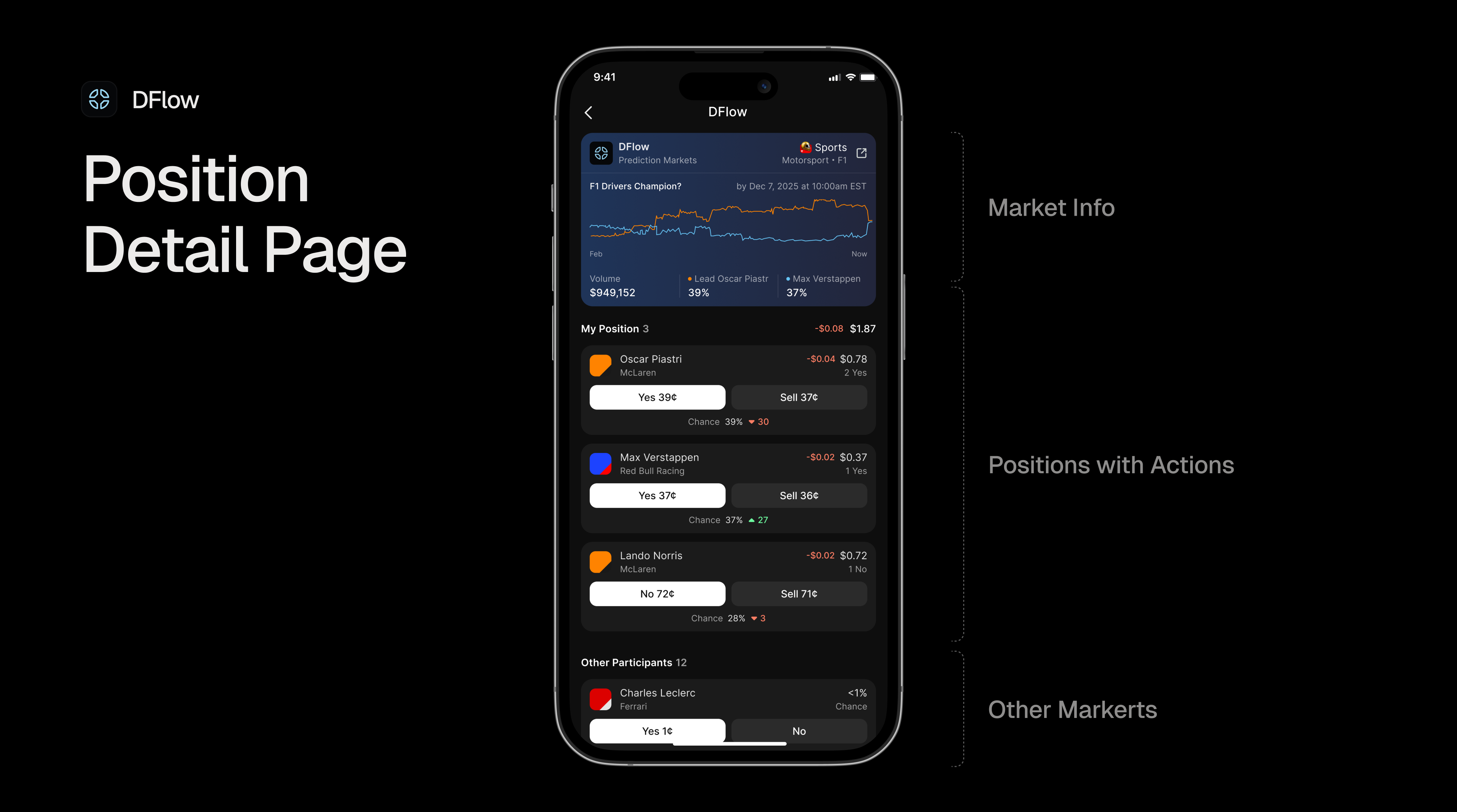 Prediction markets allow users to bet on the outcomes of real-world events. Users can buy "Yes" or "No" outcome tokens with the price of these tokens reflecting the market's collective belief about the likelihood of an event occurring.
Our Markets API provides all the information you need to build prediction market interfaces, including:
* basic protocol information,
* market title and status,
* bid/ask prices for Yes and No outcomes,
* trading volume and open interest,
* outcome tokens information,
* timing information (open, close, expirationTime), etc.
By enriching the response with all of this information, it makes the API powerful enough to drive full-fledged dashboards and applications as well as smaller widgets, cards or notifications - All in a single API call!
## Supported Protocols
Our Markets API currently supports prediction markets from [**DFlow**](https://dflow.net), who are the official provider for [Kalshi](https://kalshi.com).
If you want more information on the protocols that are supported or want to request more providers, please refer to the [Supported Protocols Section](/markets/supported-protocols) page.
## Understanding Events and Markets
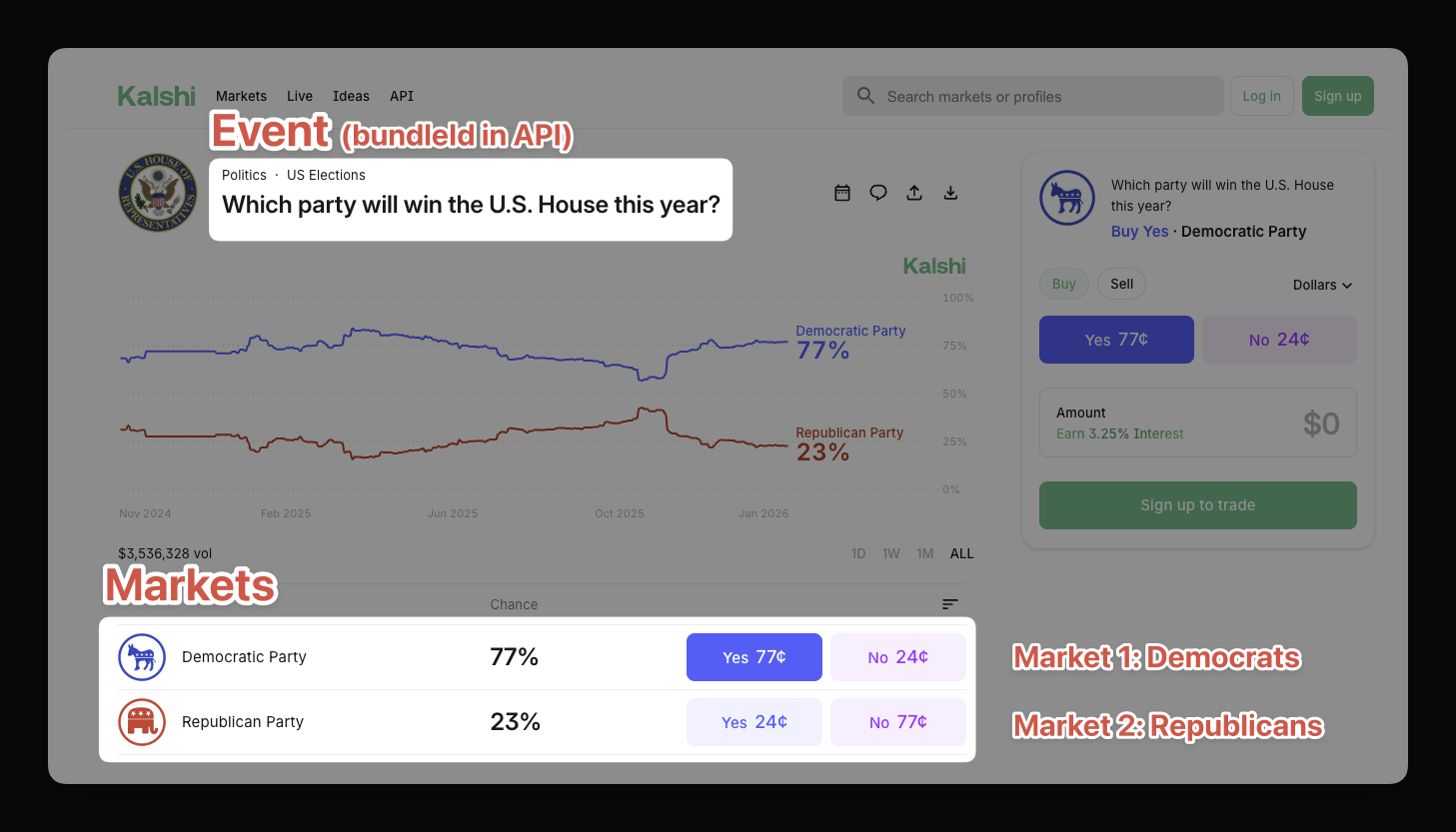
When working with prediction markets, it's important to understand the distinction between **events** and **markets**:
* **Markets** are the individual tradable outcomes within an event (e.g., "Democratic Party wins - Yes/No", "Republican Party wins - Yes/No")
* **Events** are groupings of markets (e.g., "Which party will win control of the US House in 2026?")
### Markets
A single event typically has multiple markets. In our example the question "Which party will win control of the US House in 2026?" will create two markets:
1. Market for the **Domocratic Party** (Yes/No) and
2. Market for the **Republican Party** (Yes/No).
For crypto specifially, it is often the case that each market gets multiple token markets on top:
* **CASH market** — For purchasing with Phantom's stable coin
* **USDC market** — For purchasing with USDC
Which means that the API will return 4 markets for this single event:
| Event | Markets | Token |
| ------------------------- | ------------------------- | ----- |
| Control of the House 2026 | Democratic Party (Yes/No) | USDC |
| | Democratic Party (Yes/No) | CASH |
| | Republican Party (Yes/No) | USDC |
| | Republican Party (Yes/No) | CASH |
### Events
The `bundleId` field is the key to grouping markets that belong to the same underlying event. All markets for the same question share the same `bundleId`, allowing you to:
* Display related bets together in your UI
* Create "position bundles" showing all positions for a single event
* Build event-centric dashboards similar to Kalshi's interface
### Example: Grouping Political Markets
Our API will return you four markets for the "Control of the House 2026" event. In order to make it easier for your users, it is recommended to group these markets by their `bundleId`. The example bleow illustrates this concept for the CASH markets:
```json {5, 13} Multiple markets with same bundleId theme={null}
// Market 1: Democratic Party (Cash)
{
"id": "dflow.prediction.house-2026-dem-cash",
"title": "Democratic Party will win control of US House",
"bundleId": "house-control-2026",
...
}
// Market 2: Republican Party (Cash)
{
"id": "dflow.prediction.house-2026-rep-cash",
"title": "Republican Party will win control of US House",
"bundleId": "house-control-2026",
...
}
```
All markets share the same `bundleId: "house-control-2026"`, indicating they belong to the same underlying event.
To group markets by event in your application, filter or group the API
response by the `bundleId` field. This recreates the "event" view from
platforms like Kalshi.
```typescript Grouping Markets by Event theme={null}
// Group markets by event using bundleId
const marketsByEvent = markets.reduce((acc, market) => {
const eventId = market.bundleId;
if (!acc[eventId]) acc[eventId] = [];
acc[eventId].push(market);
return acc;
}, {});
```
## Data Structure
Below is an example of a prediction market response from the Markets API. Based on customer demand, we may add more fields to the response in the future.
For the latest data structure, please have a look at our [Markets API Reference](/api-reference/markets/list-all-markets) page.
Please note that we do our best to design our APIs to be non-breaking. It is
recommended to filter the response and only include the fields / types you
need to ensure it won't break your application if new fields are added over
time.
```json Prediction Markets Data Structure theme={null}
{
"id": "string", // Unique market identifier
"type": "prediction", // Market type
"provider": {
"id": "string", // Protocol identifier
"name": "string", // Protocol display name
"icon": "string" // Protocol icon URL
},
"title": "string", // Market question/title
"subtitle": "string", // Additional context (optional)
"status": "open|closed|settled", // Market status
"result": "string", // Outcome result (when settled)
"volume": number, // Total trading volume (USD)
"openInterest": number, // Open interest (USD)
"yesBid": number, // Best bid price for Yes outcome
"yesAsk": number, // Best ask price for Yes outcome
"noBid": number, // Best bid price for No outcome
"noAsk": number, // Best ask price for No outcome
"openTime": number, // Unix timestamp when market opened
"closeTime": number, // Unix timestamp when trading closes
"expirationTime": number, // Unix timestamp when market expires
"yesToken": { // Yes outcome token
"address": "string", // Token mint address
"symbol": "string", // Token symbol
"decimals": number, // Token decimals
"icon": "string", // Token icon URL
"name": "string" // Token name
},
"noToken": { // No outcome token
"address": "string", // Token mint address
"symbol": "string", // Token symbol
"decimals": number, // Token decimals
"icon": "string", // Token icon URL
"name": "string" // Token name
},
"websiteUrl": "string", // Direct link to market on protocol
"bundleId": "string", // Groups markets from the same event
"additionalData": {} // Protocol-specific metadata
}
```
## Practical Example
In order to better understand how the API works, let's walk through an example response for a DFlow prediction market. This example shows a political prediction market for control of the U.S. House:
```json API Response for DFlow Prediction Market theme={null}
{
"id": "dflow.prediction.CONTROLH-2026.G7EqT9zdoRKt5RScDhpKjryEnT2SVjAViBJb34smb6SH",
"type": "prediction",
"provider": {
"id": "dflow",
"name": "DFlow",
"icon": "https://imagedelivery.net/C7jfNnfrjpAYWW6YevrFDg/d5d0e3f9-72f3-4a19-a415-6994f32c1f00/public"
},
"title": "Will Republicans win the House in 2026?",
"subtitle": "",
"status": "open",
"volume": 1858086,
"openInterest": 1113892,
"yesBid": 0.23,
"yesAsk": 0.24,
"noBid": 0.76,
"noAsk": 0.77,
"openTime": 1730905200,
"closeTime": 1801494000,
"expirationTime": 1801494000,
"yesToken": {
"address": "7Ady9N19XAAcqPLWwSe7ngPbxegMgvEQd55V4bR4jN2z",
"symbol": "DFlowYU0114",
"decimals": 6,
"icon": "https://kalshi-public-docs.s3.amazonaws.com/series-images-webp/CONTROLH.webp",
"name": "Yes Republican Party"
},
"noToken": {
"address": "8XctSiRJZhLA6QaB3p61iZwE1PCTQbbhFaDSEufkwzDQ",
"symbol": "DFlowNU0114",
"decimals": 6,
"icon": "https://kalshi-public-docs.s3.amazonaws.com/series-images-webp/CONTROLH.webp",
"name": "No Republican Party"
},
"bundleId": "dflow.prediction.CONTROLH-2026",
"additionalData": {
"ticker": "CONTROLH-2026-R",
"eventTicker": "CONTROLH-2026",
"marketLedger": "G7EqT9zdoRKt5RScDhpKjryEnT2SVjAViBJb34smb6SH",
"purchaseToken": {
"icon": "https://raw.githubusercontent.com/solana-labs/token-list/main/assets/mainnet/EPjFWdd5AufqSSqeM2qN1xzybapC8G4wEGGkZwyTDt1v/logo.png",
"symbol": "USDC",
"address": "EPjFWdd5AufqSSqeM2qN1xzybapC8G4wEGGkZwyTDt1v",
"decimals": 6
},
"redemptionStatus": "pending"
}
}
```
### Understanding the Response
What you can see here is the original response from the API. As mentioned in the introduction section, this response is powerful enough to drive full-fledged dashboards and applications.
Let's break it down into its components:
* **Market Identity:**
* `id`: Unique identifier combining protocol, market type, and market slug
* `type`: Market category (always `prediction` for prediction markets)
* `provider`: Protocol information for branding in your UI
* `title`: The market question users are betting on
* `subtitle`: Additional context about the market (optional)
* `websiteUrl`: Direct link to the market on the protocol's website
* **Market Status:**
* `status`: Current state of the market
* `open` — Market is active and accepting trades
* `closed` — Trading has ended, awaiting settlement
* `settled` — Outcome has been determined and payouts processed
* `result`: The final outcome (only present when settled)
* **Pricing (Implied Probabilities):**
* `yesBid` (0.23) / `yesAsk` (0.24) — Bid/ask prices for Yes tokens, implying \~23-24% probability
* `noBid` (0.76) / `noAsk` (0.77) — Bid/ask prices for No tokens, implying \~76-77% probability
**Note:** Prices represent implied probabilities. A Yes price of 0.23 means the market implies a 23% chance of the outcome occurring.
* **Market Metrics:**
* `volume` (\$1.86M) — Total trading volume in USD
* `openInterest` (\$1.11M) — Total value of outstanding positions
* **Timing:**
* `openTime` — When the market opened for trading (Unix timestamp)
* `closeTime` — When trading will close (Unix timestamp)
* `expirationTime` — When the market will be settled (Unix timestamp)
* **Outcome Tokens:**
* `yesToken` / `noToken` — Token information for each outcome, including mint addresses for on-chain interaction
* **Bundle ID:**
* `bundleId` ("dflow\.prediction.CONTROLH-2026") — Groups markets belonging to the same underlying event. All markets with the same bundleId are related (e.g., different party outcomes for the same election, or the same market with different purchase tokens).
* **Additional Data:** The `additionalData` object contains protocol-specific metadata. See [Protocol-Specific Additional Data](#protocol-specific-additional-data) for details.
## Filtering Prediction Markets
If you are only interested in specific prediction markets, you can use the `filters` parameter to refine your API requests.
Filters only work for `prediction` market type. Make sure to set this type
before sending your request.
As of now, we support filtering by the following status values:
* `open`
* `closed`
* `settled`
**Examples:**
* Open only: `{"prediction":{"status":["open"]}}`
* Exclude settled: `{"prediction":{"status":["open","closed"]}}`
If you need more filter options or want to request a feature, please reach out to us at [hello@dialect.to](mailto:hello@dialect.to).
## Tracking Prediction Positions
Our [Positions API](/api-reference/positions/list-all-market-positions-by-wallet-address) and [PnL API](/api-reference/positions/get-pnl-data-for-wallet-positions) give you everything you need to track a user's prediction market activity. Without them, tracking DFlow positions requires multiple steps:
1. Fetch all token accounts for a wallet
2. Get tokenized account mints
3. Use DFlow's endpoint to filter outcome token mints
4. Fetch market details for those mints
The Positions API simplifies this to a single call.
### Fetching Positions
Our Positions API is designed to return you all positions for a given wallet address. Then you can add the `type=prediction` parameter to filter the positions by market type.
```typescript TypeScript theme={null}
const response = await fetch(
'https://markets.dial.to/api/v0/positions/owners?walletAddresses=YOUR_WALLET&type=prediction',
{
headers: {
'x-dialect-client-key': 'YOUR_CLIENT_KEY'
}
}
);
const data = await response.json();
console.log(data.positions);
```
```bash cURL theme={null}
curl 'https://markets.dial.to/api/v0/positions/owners?walletAddresses=YOUR_WALLET&type=prediction' \
--header 'x-dialect-client-key: YOUR_CLIENT_KEY'
```
### Grouping Positions by Event
Use the `bundleId` field to group a user's positions that belong to the same underlying event:
```typescript Grouping Positions by Event theme={null}
// Group positions by event using bundleId
const positionsByEvent = positions.reduce((acc, position) => {
const eventId = position.bundleId;
if (!acc[eventId]) acc[eventId] = [];
acc[eventId].push(position);
return acc;
}, {});
```
### Filtering for Active Positions
By default, the Positions API returns all positions. To get only positions in markets that are still actively trading, filter by `market.status`:
```typescript Filtering for Active Positions theme={null}
// Filter for positions in open markets only
const activePositions = positions.filter(
(position) => position.market.status === "open",
);
```
The `market.status` field indicates the current state of the market:
| Status | Description |
| --------- | ------------------------------------------------------- |
| `open` | Market is active and accepting trades |
| `closed` | Trading has ended, awaiting settlement |
| `settled` | Outcome has been determined, position may be redeemable |
Server-side filtering for positions by status is coming soon via the `filters`
parameter. For now, use client-side filtering as shown above.
If you need more filtering options, please reach out to us at [hello@dialect.to](mailto:hello@dialect.to).
### Cost Basis
The Positions API includes cost basis data for prediction market positions, giving you insight into a user's average entry price and total capital committed to a position. It answers the question: **“How much did I spend to acquire the tokens I currently hold?”**
Cost basis is calculated using the **average cost method**, which is the same approach used by traditional brokerages.
#### Response Fields
The following fields are included on each prediction position:
| Field | Type | Description |
| ---------------- | -------- | --------------------------------------------------------------------------- |
| `costBasisTotal` | `number` | Total capital committed to the position (sum of all buys at their prices) |
| `costBasisAvg` | `number` | Average price paid per token (total cost basis divided by current quantity) |
#### Example Response
Here is an example of a prediction position response that includes cost basis data:
```json {15-18} Prediction Position with Cost Basis theme={null}
{
"id": "dflow.prediction.KXNCAAMBGAME-26FEB13MASSAKR.GKmqm1hCPznFXK3Qku7y6PT2aDutRHiENvgT5mkkYzKf.yes.6JpNV6DK88auwzKVizdeT4Bw3D44sam5GqjcPCJ7y176",
"type": "prediction",
"ownerAddress": "6JpNV6DK88auwzKVizdeT4Bw3D44sam5GqjcPCJ7y176",
"bundleId": "dflow.prediction.KXNCAAMBGAME-26FEB13MASSAKR",
"marketId": "dflow.prediction.KXNCAAMBGAME-26FEB13MASSAKR.GKmqm1hCPznFXK3Qku7y6PT2aDutRHiENvgT5mkkYzKf",
"token": {
"address": "G5ntr63hgHAhJjNkJgfumexUDpVbz2z8FaoqRhnMxe9w",
"symbol": "DFlowYC66dc",
"decimals": 6,
"icon": "https://kalshi-public-docs.s3.amazonaws.com/series-images-webp/KXNCAAMBGAME.webp",
"name": "Yes Akron"
},
"side": "yes",
"amount": 2,
"amountUsd": 2,
"costBasisTotal": 1.772609,
"costBasisAvg": 0.8863045,
"additionalData": {},
"market": {
// more market data
}
}
```
In this example:
* The user holds **2 "Yes Akron" tokens** (`amount: 2`) worth **\$2.00** (`amountUsd: 2`)
* Their total capital committed is **\$1.77** (`costBasisTotal: 1.772609`)
* Their average entry price is **\$0.89 per token** (`costBasisAvg: 0.8863045`)
* Since the market settled as "yes" and each token pays out \$1.00, this position is profitable
#### How Cost Basis is Calculated
Cost basis tracks two values per position: the **total capital** (`costBasisTotal`) committed and the **average price per token** (`costBasisAvg`). These values evolve with every trade event:
| | Buy | Sell | Full Exit |
| -------------------- | --------------------------- | -------------------------------- | -------------- |
| **Amount** | + buy amount | - sell amount | Resets to 0 |
| **Total Cost Basis** | + buy amount × buy price | - sell amount × current avg cost | Resets to 0 |
| **Avg Cost Basis** | Recomputed (total / amount) | Unchanged | Resets to null |
Note that the sell price does not affect cost basis. Sells are treated purely as inventory reductions at average cost. When quantity reaches zero (full exit), any subsequent buys are treated as a new position with no historical carryover.
**Transfers**
Besides trades, positions can also change through token transfers. Here is how transfers affect cost basis:
* **Inbound transfers** are treated as buy events at the current average cost basis. If no position exists yet (i.e., the transfer is the first event for this wallet), the current market price is used instead.
* **Outbound transfers** are treated as sell events, reducing both quantity and total cost basis.
**Example**
Here is a step-by-step example showing how cost basis evolves across multiple trades:
| Event | Quantity | Total Cost Basis | Avg Cost Basis |
| -------------------- | -------- | ---------------- | -------------- |
| Buy 100 @ \$0.25 | 100 | \$25.00 | \$0.25 |
| Buy 50 @ \$0.40 | 150 | \$45.00 | \$0.30 |
| Sell 50 @ \$0.50 | 100 | \$30.00 | \$0.30 |
| Sell 100 (full exit) | 0 | \$0.00 | null |
| Buy 200 @ \$0.60 | 200 | \$120.00 | \$0.60 |
Notice that after the full exit, the new buy starts fresh with no carryover from the previous trading episode.
### PnL
PnL allows the user to see how their positions are performing. It answers the question: **"Am I profitable or am I loosing money?"**
The [Positions API](/api-reference/positions/list-all-market-positions-by-wallet-address) returns PnL for **active positions** only. Once a user fully redeems their outcome tokens, the position is closed and no longer returned. Use the [PnL API](/api-reference/positions/get-pnl-data-for-wallet-positions) to access PnL across all positions, including closed ones.
#### Response Fields
Each prediction position includes a `pnl` object containing the following fields:
| Field | Type | Description |
| ------------------ | -------- | -------------------------------------------------------- |
| `unrealized` | `number` | Current gain or loss on shares still held |
| `unrealizedPct` | `number` | Unrealized PnL as a percentage |
| `realized` | `number` | Profit or loss locked in from shares already sold |
| `total` | `number` | Combined PnL for the current position |
| `totalLifetime` | `number` | Cumulative total PnL including already closed positions |
| `realizedLifetime` | `number` | Cumulative realized PnL including fully closed positions |
`total` and `totalLifetime` differ when a user has fully exited and re-entered
a position. `total` reflects the current open position only, while
`totalLifetime` carries forward gains and losses from previous closed
episodes.
#### Example Response
```json {12-23} Prediction Position with PnL theme={null}
{
"id": "dflow.prediction.KXFEDCHAIRNOM-29.6Ryen6J3RETCd4oqaViA6QsPxvxSPjLYxcPDLHa7qK19.yes.6JpNV6DK88auwzKVizdeT4Bw3D44sam5GqjcPCJ7y176",
"type": "prediction",
"ownerAddress": "6JpNV6DK88auwzKVizdeT4Bw3D44sam5GqjcPCJ7y176",
"bundleId": "dflow.prediction.KXFEDCHAIRNOM-29",
"marketId": "dflow.prediction.KXFEDCHAIRNOM-29.6Ryen6J3RETCd4oqaViA6QsPxvxSPjLYxcPDLHa7qK19",
"side": "yes",
"amount": 1,
"amountUsd": 1,
"costBasisTotal": 0.95,
"costBasisAvg": 0.95,
"pnl": {
"unrealized": 0.05,
"unrealizedPct": 0.0494,
"realized": 0,
"total": 0.05,
"realizedLifetime": 0,
"totalLifetime": 0.05,
"capital": {
"invested": 0.95,
"investedLifetime": 0.95,
"netFlow": -0.95,
"netFlowLifetime": -0.95
}
},
"market": {
// market data
}
}
```
In this example:
* The user holds **1 Yes token** currently worth **\$1.00** (`amountUsd`)
* Their cost basis is **\$0.95** (`costBasisTotal`), reflecting the buying price of the token
* No shares have been sold yet, so:
* `realized` PnL is **\$0** and
* `unrealized` PnL is **+\$0.05** (current value minus cost basis)
* `total` is **+\$0.05**
**Unrealized PnL** is calculated using the **bid-side price** of the outcome
token, which represents what a user would actually receive if they sold their
position today.
### Capital
The `capital` object is available in the [PnL API](/api-reference/positions/get-pnl-data-for-wallet-positions) and nested inside the `pnl` object in the [Positions API](/api-reference/positions/list-all-market-positions-by-wallet-address). It answers the question: **"Have I broken even yet, and how much of my own money is still at stake?"**
Unlike PnL, capital values are **price-agnostic**, which means they only change when a buy or sell event happens, not when the market moves. This makes the `capital` object a stable measure of your capital commitment to a position.
#### How it differs from PnL and Cost Basis
| Metric | Changes on price move? | Changes on buy? | Changes on sell? |
| ------------------ | ---------------------- | --------------- | ------------------- |
| `pnl.unrealized` | Yes | Yes | Yes |
| `costBasisTotal` | No | Yes | Yes (adjusted down) |
| `capital.invested` | No | Yes (increases) | No |
| `capital.netFlow` | No | Yes (decreases) | Yes (increases) |
#### Response Fields
| Field | Type | Description |
| -------------------------- | -------- | ----------------------------------------------------------------------------------------------- |
| `capital.invested` | `number` | Sum of all buy costs for the active position. Increases with every buy, never decreases. |
| `capital.investedLifetime` | `number` | Sum of all buy costs across all re-entries for this market. |
| `capital.netFlow` | `number` | Net capital flow for the active position: money out vs. money in. See below for interpretation. |
| `capital.netFlowLifetime` | `number` | Net capital flow across all re-entries for this market. |
#### Example Response
```json {8-13} Position with Capital Object (from PnL API) theme={null}
{
"positionId": "dflow.prediction.KXFEDCHAIRNOM-29.6Ryen6J3RETCd4oqaViA6QsPxvxSPjLYxcPDLHa7qK19.yes.6JpNV6DK88auwzKVizdeT4Bw3D44sam5GqjcPCJ7y176",
"marketId": "dflow.prediction.KXFEDCHAIRNOM-29.6Ryen6J3RETCd4oqaViA6QsPxvxSPjLYxcPDLHa7qK19",
"ownerAddress": "6JpNV6DK88auwzKVizdeT4Bw3D44sam5GqjcPCJ7y176",
"total": 0.05,
"realized": 0,
"unrealized": 0.05,
"capital": {
"invested": 0.95,
"investedLifetime": 0.95,
"netFlow": -0.95,
"netFlowLifetime": -0.95
},
"realizedLifetime": 0,
"totalLifetime": 0.05
}
```
#### Understanding netFlow
`netFlow` is calculated as **total sells minus total buys**. It tracks whether you've gotten your money back through sales.
| netFlow value | What it means |
| ------------- | --------------------------------------------------------------------------------------------------- |
| Negative | Your own capital is still locked in the position. You haven't sold enough to cover what you put in. |
| Zero | **Breakeven.** Your initial investment has been fully returned through sells. |
| Positive | You've earned back what you put in. The remaining amount is additional realized returns. |
`netFlow` is unaffected by price changes. It only moves when you execute a trade:
* **Buy** → `netFlow` decreases (more of your capital is committed)
* **Sell** → `netFlow` increases (capital is returned to you)
#### Example
Here is a step-by-step example showing how `invested` and `netFlow` evolve across multiple trades, assuming an initial buy of \$100:
| Event | invested | netFlow | Interpretation |
| -------------- | -------- | ------- | ---------------------------------------------------- |
| Buy \$100 | \$100 | -\$100 | All capital locked in position |
| Buy \$100 more | \$200 | -\$200 | More capital committed (DCA) |
| Sell for \$75 | \$200 | -\$125 | Still \$125 of own capital in position |
| Sell for \$125 | \$200 | \$0 | **Breakeven** — initial investment fully regained |
| Sell for \$50 | \$200 | +\$50 | \$50 above initial investment — pure realized profit |
Note that `invested` only increases with buys, regardless of how much was sold. It represents the cumulative capital committed to the position, not the current exposure.
Use `capital.netFlow` to show users how far they are from breakeven. A value of 0 means they've gotten their money back through sells. Anything above 0 is pure **realized** profit.
## Protocol-Specific Additional Data
The `additionalData` field contains DFlow-specific metadata that may be useful for advanced integrations:
```json DFlow Additional Data theme={null}
{
"additionalData": {
"ticker": "CONTROLH-2026-R",
"eventTicker": "CONTROLH-2026",
"marketLedger": "G7EqT9zdoRKt5RScDhpKjryEnT2SVjAViBJb34smb6SH",
"purchaseToken": {
"icon": "https://...",
"symbol": "USDC",
"address": "EPjFWdd5AufqSSqeM2qN1xzybapC8G4wEGGkZwyTDt1v",
"decimals": 6
},
"redemptionStatus": "pending"
}
}
```
| Field | Description |
| ------------------ | --------------------------------------------------------------------------------------- |
| `ticker` | Kalshi's / DFlow's specific market identifier (e.g., "CONTROLH-2026-R" for Republicans) |
| `eventTicker` | Event-level identifier — all markets in the same event share this ticker |
| `marketLedger` | On-chain address of the market ledger that handles positions and redemptions |
| `purchaseToken` | The token used to purchase outcome tokens (USDC or CASH) |
| `redemptionStatus` | Current redemption state: `open` or `pending` |
The `eventTicker` in `additionalData` corresponds conceptually to the
`bundleId` field. Both can be used to identify markets that belong together.
## Take action in a market
We are currently not supporting Blinks for prediction markets. If you want to request this feature, please reach out to us at [hello@dialect.to](mailto:hello@dialect.to).
If you still want to support actions, please checkout [DFlow's documentation](https://pond.dflow.net/build/prediction-markets/).
Prediction markets allow users to bet on the outcomes of real-world events. Users can buy "Yes" or "No" outcome tokens with the price of these tokens reflecting the market's collective belief about the likelihood of an event occurring.
Our Markets API provides all the information you need to build prediction market interfaces, including:
* basic protocol information,
* market title and status,
* bid/ask prices for Yes and No outcomes,
* trading volume and open interest,
* outcome tokens information,
* timing information (open, close, expirationTime), etc.
By enriching the response with all of this information, it makes the API powerful enough to drive full-fledged dashboards and applications as well as smaller widgets, cards or notifications - All in a single API call!
## Supported Protocols
Our Markets API currently supports prediction markets from [**DFlow**](https://dflow.net), who are the official provider for [Kalshi](https://kalshi.com).
If you want more information on the protocols that are supported or want to request more providers, please refer to the [Supported Protocols Section](/markets/supported-protocols) page.
## Understanding Events and Markets

When working with prediction markets, it's important to understand the distinction between **events** and **markets**:
* **Markets** are the individual tradable outcomes within an event (e.g., "Democratic Party wins - Yes/No", "Republican Party wins - Yes/No")
* **Events** are groupings of markets (e.g., "Which party will win control of the US House in 2026?")
### Markets
A single event typically has multiple markets. In our example the question "Which party will win control of the US House in 2026?" will create two markets:
1. Market for the **Domocratic Party** (Yes/No) and
2. Market for the **Republican Party** (Yes/No).
For crypto specifially, it is often the case that each market gets multiple token markets on top:
* **CASH market** — For purchasing with Phantom's stable coin
* **USDC market** — For purchasing with USDC
Which means that the API will return 4 markets for this single event:
| Event | Markets | Token |
| ------------------------- | ------------------------- | ----- |
| Control of the House 2026 | Democratic Party (Yes/No) | USDC |
| | Democratic Party (Yes/No) | CASH |
| | Republican Party (Yes/No) | USDC |
| | Republican Party (Yes/No) | CASH |
### Events
The `bundleId` field is the key to grouping markets that belong to the same underlying event. All markets for the same question share the same `bundleId`, allowing you to:
* Display related bets together in your UI
* Create "position bundles" showing all positions for a single event
* Build event-centric dashboards similar to Kalshi's interface
### Example: Grouping Political Markets
Our API will return you four markets for the "Control of the House 2026" event. In order to make it easier for your users, it is recommended to group these markets by their `bundleId`. The example bleow illustrates this concept for the CASH markets:
```json {5, 13} Multiple markets with same bundleId theme={null}
// Market 1: Democratic Party (Cash)
{
"id": "dflow.prediction.house-2026-dem-cash",
"title": "Democratic Party will win control of US House",
"bundleId": "house-control-2026",
...
}
// Market 2: Republican Party (Cash)
{
"id": "dflow.prediction.house-2026-rep-cash",
"title": "Republican Party will win control of US House",
"bundleId": "house-control-2026",
...
}
```
All markets share the same `bundleId: "house-control-2026"`, indicating they belong to the same underlying event.
To group markets by event in your application, filter or group the API
response by the `bundleId` field. This recreates the "event" view from
platforms like Kalshi.
```typescript Grouping Markets by Event theme={null}
// Group markets by event using bundleId
const marketsByEvent = markets.reduce((acc, market) => {
const eventId = market.bundleId;
if (!acc[eventId]) acc[eventId] = [];
acc[eventId].push(market);
return acc;
}, {});
```
## Data Structure
Below is an example of a prediction market response from the Markets API. Based on customer demand, we may add more fields to the response in the future.
For the latest data structure, please have a look at our [Markets API Reference](/api-reference/markets/list-all-markets) page.
Please note that we do our best to design our APIs to be non-breaking. It is
recommended to filter the response and only include the fields / types you
need to ensure it won't break your application if new fields are added over
time.
```json Prediction Markets Data Structure theme={null}
{
"id": "string", // Unique market identifier
"type": "prediction", // Market type
"provider": {
"id": "string", // Protocol identifier
"name": "string", // Protocol display name
"icon": "string" // Protocol icon URL
},
"title": "string", // Market question/title
"subtitle": "string", // Additional context (optional)
"status": "open|closed|settled", // Market status
"result": "string", // Outcome result (when settled)
"volume": number, // Total trading volume (USD)
"openInterest": number, // Open interest (USD)
"yesBid": number, // Best bid price for Yes outcome
"yesAsk": number, // Best ask price for Yes outcome
"noBid": number, // Best bid price for No outcome
"noAsk": number, // Best ask price for No outcome
"openTime": number, // Unix timestamp when market opened
"closeTime": number, // Unix timestamp when trading closes
"expirationTime": number, // Unix timestamp when market expires
"yesToken": { // Yes outcome token
"address": "string", // Token mint address
"symbol": "string", // Token symbol
"decimals": number, // Token decimals
"icon": "string", // Token icon URL
"name": "string" // Token name
},
"noToken": { // No outcome token
"address": "string", // Token mint address
"symbol": "string", // Token symbol
"decimals": number, // Token decimals
"icon": "string", // Token icon URL
"name": "string" // Token name
},
"websiteUrl": "string", // Direct link to market on protocol
"bundleId": "string", // Groups markets from the same event
"additionalData": {} // Protocol-specific metadata
}
```
## Practical Example
In order to better understand how the API works, let's walk through an example response for a DFlow prediction market. This example shows a political prediction market for control of the U.S. House:
```json API Response for DFlow Prediction Market theme={null}
{
"id": "dflow.prediction.CONTROLH-2026.G7EqT9zdoRKt5RScDhpKjryEnT2SVjAViBJb34smb6SH",
"type": "prediction",
"provider": {
"id": "dflow",
"name": "DFlow",
"icon": "https://imagedelivery.net/C7jfNnfrjpAYWW6YevrFDg/d5d0e3f9-72f3-4a19-a415-6994f32c1f00/public"
},
"title": "Will Republicans win the House in 2026?",
"subtitle": "",
"status": "open",
"volume": 1858086,
"openInterest": 1113892,
"yesBid": 0.23,
"yesAsk": 0.24,
"noBid": 0.76,
"noAsk": 0.77,
"openTime": 1730905200,
"closeTime": 1801494000,
"expirationTime": 1801494000,
"yesToken": {
"address": "7Ady9N19XAAcqPLWwSe7ngPbxegMgvEQd55V4bR4jN2z",
"symbol": "DFlowYU0114",
"decimals": 6,
"icon": "https://kalshi-public-docs.s3.amazonaws.com/series-images-webp/CONTROLH.webp",
"name": "Yes Republican Party"
},
"noToken": {
"address": "8XctSiRJZhLA6QaB3p61iZwE1PCTQbbhFaDSEufkwzDQ",
"symbol": "DFlowNU0114",
"decimals": 6,
"icon": "https://kalshi-public-docs.s3.amazonaws.com/series-images-webp/CONTROLH.webp",
"name": "No Republican Party"
},
"bundleId": "dflow.prediction.CONTROLH-2026",
"additionalData": {
"ticker": "CONTROLH-2026-R",
"eventTicker": "CONTROLH-2026",
"marketLedger": "G7EqT9zdoRKt5RScDhpKjryEnT2SVjAViBJb34smb6SH",
"purchaseToken": {
"icon": "https://raw.githubusercontent.com/solana-labs/token-list/main/assets/mainnet/EPjFWdd5AufqSSqeM2qN1xzybapC8G4wEGGkZwyTDt1v/logo.png",
"symbol": "USDC",
"address": "EPjFWdd5AufqSSqeM2qN1xzybapC8G4wEGGkZwyTDt1v",
"decimals": 6
},
"redemptionStatus": "pending"
}
}
```
### Understanding the Response
What you can see here is the original response from the API. As mentioned in the introduction section, this response is powerful enough to drive full-fledged dashboards and applications.
Let's break it down into its components:
* **Market Identity:**
* `id`: Unique identifier combining protocol, market type, and market slug
* `type`: Market category (always `prediction` for prediction markets)
* `provider`: Protocol information for branding in your UI
* `title`: The market question users are betting on
* `subtitle`: Additional context about the market (optional)
* `websiteUrl`: Direct link to the market on the protocol's website
* **Market Status:**
* `status`: Current state of the market
* `open` — Market is active and accepting trades
* `closed` — Trading has ended, awaiting settlement
* `settled` — Outcome has been determined and payouts processed
* `result`: The final outcome (only present when settled)
* **Pricing (Implied Probabilities):**
* `yesBid` (0.23) / `yesAsk` (0.24) — Bid/ask prices for Yes tokens, implying \~23-24% probability
* `noBid` (0.76) / `noAsk` (0.77) — Bid/ask prices for No tokens, implying \~76-77% probability
**Note:** Prices represent implied probabilities. A Yes price of 0.23 means the market implies a 23% chance of the outcome occurring.
* **Market Metrics:**
* `volume` (\$1.86M) — Total trading volume in USD
* `openInterest` (\$1.11M) — Total value of outstanding positions
* **Timing:**
* `openTime` — When the market opened for trading (Unix timestamp)
* `closeTime` — When trading will close (Unix timestamp)
* `expirationTime` — When the market will be settled (Unix timestamp)
* **Outcome Tokens:**
* `yesToken` / `noToken` — Token information for each outcome, including mint addresses for on-chain interaction
* **Bundle ID:**
* `bundleId` ("dflow\.prediction.CONTROLH-2026") — Groups markets belonging to the same underlying event. All markets with the same bundleId are related (e.g., different party outcomes for the same election, or the same market with different purchase tokens).
* **Additional Data:** The `additionalData` object contains protocol-specific metadata. See [Protocol-Specific Additional Data](#protocol-specific-additional-data) for details.
## Filtering Prediction Markets
If you are only interested in specific prediction markets, you can use the `filters` parameter to refine your API requests.
Filters only work for `prediction` market type. Make sure to set this type
before sending your request.
As of now, we support filtering by the following status values:
* `open`
* `closed`
* `settled`
**Examples:**
* Open only: `{"prediction":{"status":["open"]}}`
* Exclude settled: `{"prediction":{"status":["open","closed"]}}`
If you need more filter options or want to request a feature, please reach out to us at [hello@dialect.to](mailto:hello@dialect.to).
## Tracking Prediction Positions
Our [Positions API](/api-reference/positions/list-all-market-positions-by-wallet-address) and [PnL API](/api-reference/positions/get-pnl-data-for-wallet-positions) give you everything you need to track a user's prediction market activity. Without them, tracking DFlow positions requires multiple steps:
1. Fetch all token accounts for a wallet
2. Get tokenized account mints
3. Use DFlow's endpoint to filter outcome token mints
4. Fetch market details for those mints
The Positions API simplifies this to a single call.
### Fetching Positions
Our Positions API is designed to return you all positions for a given wallet address. Then you can add the `type=prediction` parameter to filter the positions by market type.
```typescript TypeScript theme={null}
const response = await fetch(
'https://markets.dial.to/api/v0/positions/owners?walletAddresses=YOUR_WALLET&type=prediction',
{
headers: {
'x-dialect-client-key': 'YOUR_CLIENT_KEY'
}
}
);
const data = await response.json();
console.log(data.positions);
```
```bash cURL theme={null}
curl 'https://markets.dial.to/api/v0/positions/owners?walletAddresses=YOUR_WALLET&type=prediction' \
--header 'x-dialect-client-key: YOUR_CLIENT_KEY'
```
### Grouping Positions by Event
Use the `bundleId` field to group a user's positions that belong to the same underlying event:
```typescript Grouping Positions by Event theme={null}
// Group positions by event using bundleId
const positionsByEvent = positions.reduce((acc, position) => {
const eventId = position.bundleId;
if (!acc[eventId]) acc[eventId] = [];
acc[eventId].push(position);
return acc;
}, {});
```
### Filtering for Active Positions
By default, the Positions API returns all positions. To get only positions in markets that are still actively trading, filter by `market.status`:
```typescript Filtering for Active Positions theme={null}
// Filter for positions in open markets only
const activePositions = positions.filter(
(position) => position.market.status === "open",
);
```
The `market.status` field indicates the current state of the market:
| Status | Description |
| --------- | ------------------------------------------------------- |
| `open` | Market is active and accepting trades |
| `closed` | Trading has ended, awaiting settlement |
| `settled` | Outcome has been determined, position may be redeemable |
Server-side filtering for positions by status is coming soon via the `filters`
parameter. For now, use client-side filtering as shown above.
If you need more filtering options, please reach out to us at [hello@dialect.to](mailto:hello@dialect.to).
### Cost Basis
The Positions API includes cost basis data for prediction market positions, giving you insight into a user's average entry price and total capital committed to a position. It answers the question: **“How much did I spend to acquire the tokens I currently hold?”**
Cost basis is calculated using the **average cost method**, which is the same approach used by traditional brokerages.
#### Response Fields
The following fields are included on each prediction position:
| Field | Type | Description |
| ---------------- | -------- | --------------------------------------------------------------------------- |
| `costBasisTotal` | `number` | Total capital committed to the position (sum of all buys at their prices) |
| `costBasisAvg` | `number` | Average price paid per token (total cost basis divided by current quantity) |
#### Example Response
Here is an example of a prediction position response that includes cost basis data:
```json {15-18} Prediction Position with Cost Basis theme={null}
{
"id": "dflow.prediction.KXNCAAMBGAME-26FEB13MASSAKR.GKmqm1hCPznFXK3Qku7y6PT2aDutRHiENvgT5mkkYzKf.yes.6JpNV6DK88auwzKVizdeT4Bw3D44sam5GqjcPCJ7y176",
"type": "prediction",
"ownerAddress": "6JpNV6DK88auwzKVizdeT4Bw3D44sam5GqjcPCJ7y176",
"bundleId": "dflow.prediction.KXNCAAMBGAME-26FEB13MASSAKR",
"marketId": "dflow.prediction.KXNCAAMBGAME-26FEB13MASSAKR.GKmqm1hCPznFXK3Qku7y6PT2aDutRHiENvgT5mkkYzKf",
"token": {
"address": "G5ntr63hgHAhJjNkJgfumexUDpVbz2z8FaoqRhnMxe9w",
"symbol": "DFlowYC66dc",
"decimals": 6,
"icon": "https://kalshi-public-docs.s3.amazonaws.com/series-images-webp/KXNCAAMBGAME.webp",
"name": "Yes Akron"
},
"side": "yes",
"amount": 2,
"amountUsd": 2,
"costBasisTotal": 1.772609,
"costBasisAvg": 0.8863045,
"additionalData": {},
"market": {
// more market data
}
}
```
In this example:
* The user holds **2 "Yes Akron" tokens** (`amount: 2`) worth **\$2.00** (`amountUsd: 2`)
* Their total capital committed is **\$1.77** (`costBasisTotal: 1.772609`)
* Their average entry price is **\$0.89 per token** (`costBasisAvg: 0.8863045`)
* Since the market settled as "yes" and each token pays out \$1.00, this position is profitable
#### How Cost Basis is Calculated
Cost basis tracks two values per position: the **total capital** (`costBasisTotal`) committed and the **average price per token** (`costBasisAvg`). These values evolve with every trade event:
| | Buy | Sell | Full Exit |
| -------------------- | --------------------------- | -------------------------------- | -------------- |
| **Amount** | + buy amount | - sell amount | Resets to 0 |
| **Total Cost Basis** | + buy amount × buy price | - sell amount × current avg cost | Resets to 0 |
| **Avg Cost Basis** | Recomputed (total / amount) | Unchanged | Resets to null |
Note that the sell price does not affect cost basis. Sells are treated purely as inventory reductions at average cost. When quantity reaches zero (full exit), any subsequent buys are treated as a new position with no historical carryover.
**Transfers**
Besides trades, positions can also change through token transfers. Here is how transfers affect cost basis:
* **Inbound transfers** are treated as buy events at the current average cost basis. If no position exists yet (i.e., the transfer is the first event for this wallet), the current market price is used instead.
* **Outbound transfers** are treated as sell events, reducing both quantity and total cost basis.
**Example**
Here is a step-by-step example showing how cost basis evolves across multiple trades:
| Event | Quantity | Total Cost Basis | Avg Cost Basis |
| -------------------- | -------- | ---------------- | -------------- |
| Buy 100 @ \$0.25 | 100 | \$25.00 | \$0.25 |
| Buy 50 @ \$0.40 | 150 | \$45.00 | \$0.30 |
| Sell 50 @ \$0.50 | 100 | \$30.00 | \$0.30 |
| Sell 100 (full exit) | 0 | \$0.00 | null |
| Buy 200 @ \$0.60 | 200 | \$120.00 | \$0.60 |
Notice that after the full exit, the new buy starts fresh with no carryover from the previous trading episode.
### PnL
PnL allows the user to see how their positions are performing. It answers the question: **"Am I profitable or am I loosing money?"**
The [Positions API](/api-reference/positions/list-all-market-positions-by-wallet-address) returns PnL for **active positions** only. Once a user fully redeems their outcome tokens, the position is closed and no longer returned. Use the [PnL API](/api-reference/positions/get-pnl-data-for-wallet-positions) to access PnL across all positions, including closed ones.
#### Response Fields
Each prediction position includes a `pnl` object containing the following fields:
| Field | Type | Description |
| ------------------ | -------- | -------------------------------------------------------- |
| `unrealized` | `number` | Current gain or loss on shares still held |
| `unrealizedPct` | `number` | Unrealized PnL as a percentage |
| `realized` | `number` | Profit or loss locked in from shares already sold |
| `total` | `number` | Combined PnL for the current position |
| `totalLifetime` | `number` | Cumulative total PnL including already closed positions |
| `realizedLifetime` | `number` | Cumulative realized PnL including fully closed positions |
`total` and `totalLifetime` differ when a user has fully exited and re-entered
a position. `total` reflects the current open position only, while
`totalLifetime` carries forward gains and losses from previous closed
episodes.
#### Example Response
```json {12-23} Prediction Position with PnL theme={null}
{
"id": "dflow.prediction.KXFEDCHAIRNOM-29.6Ryen6J3RETCd4oqaViA6QsPxvxSPjLYxcPDLHa7qK19.yes.6JpNV6DK88auwzKVizdeT4Bw3D44sam5GqjcPCJ7y176",
"type": "prediction",
"ownerAddress": "6JpNV6DK88auwzKVizdeT4Bw3D44sam5GqjcPCJ7y176",
"bundleId": "dflow.prediction.KXFEDCHAIRNOM-29",
"marketId": "dflow.prediction.KXFEDCHAIRNOM-29.6Ryen6J3RETCd4oqaViA6QsPxvxSPjLYxcPDLHa7qK19",
"side": "yes",
"amount": 1,
"amountUsd": 1,
"costBasisTotal": 0.95,
"costBasisAvg": 0.95,
"pnl": {
"unrealized": 0.05,
"unrealizedPct": 0.0494,
"realized": 0,
"total": 0.05,
"realizedLifetime": 0,
"totalLifetime": 0.05,
"capital": {
"invested": 0.95,
"investedLifetime": 0.95,
"netFlow": -0.95,
"netFlowLifetime": -0.95
}
},
"market": {
// market data
}
}
```
In this example:
* The user holds **1 Yes token** currently worth **\$1.00** (`amountUsd`)
* Their cost basis is **\$0.95** (`costBasisTotal`), reflecting the buying price of the token
* No shares have been sold yet, so:
* `realized` PnL is **\$0** and
* `unrealized` PnL is **+\$0.05** (current value minus cost basis)
* `total` is **+\$0.05**
**Unrealized PnL** is calculated using the **bid-side price** of the outcome
token, which represents what a user would actually receive if they sold their
position today.
### Capital
The `capital` object is available in the [PnL API](/api-reference/positions/get-pnl-data-for-wallet-positions) and nested inside the `pnl` object in the [Positions API](/api-reference/positions/list-all-market-positions-by-wallet-address). It answers the question: **"Have I broken even yet, and how much of my own money is still at stake?"**
Unlike PnL, capital values are **price-agnostic**, which means they only change when a buy or sell event happens, not when the market moves. This makes the `capital` object a stable measure of your capital commitment to a position.
#### How it differs from PnL and Cost Basis
| Metric | Changes on price move? | Changes on buy? | Changes on sell? |
| ------------------ | ---------------------- | --------------- | ------------------- |
| `pnl.unrealized` | Yes | Yes | Yes |
| `costBasisTotal` | No | Yes | Yes (adjusted down) |
| `capital.invested` | No | Yes (increases) | No |
| `capital.netFlow` | No | Yes (decreases) | Yes (increases) |
#### Response Fields
| Field | Type | Description |
| -------------------------- | -------- | ----------------------------------------------------------------------------------------------- |
| `capital.invested` | `number` | Sum of all buy costs for the active position. Increases with every buy, never decreases. |
| `capital.investedLifetime` | `number` | Sum of all buy costs across all re-entries for this market. |
| `capital.netFlow` | `number` | Net capital flow for the active position: money out vs. money in. See below for interpretation. |
| `capital.netFlowLifetime` | `number` | Net capital flow across all re-entries for this market. |
#### Example Response
```json {8-13} Position with Capital Object (from PnL API) theme={null}
{
"positionId": "dflow.prediction.KXFEDCHAIRNOM-29.6Ryen6J3RETCd4oqaViA6QsPxvxSPjLYxcPDLHa7qK19.yes.6JpNV6DK88auwzKVizdeT4Bw3D44sam5GqjcPCJ7y176",
"marketId": "dflow.prediction.KXFEDCHAIRNOM-29.6Ryen6J3RETCd4oqaViA6QsPxvxSPjLYxcPDLHa7qK19",
"ownerAddress": "6JpNV6DK88auwzKVizdeT4Bw3D44sam5GqjcPCJ7y176",
"total": 0.05,
"realized": 0,
"unrealized": 0.05,
"capital": {
"invested": 0.95,
"investedLifetime": 0.95,
"netFlow": -0.95,
"netFlowLifetime": -0.95
},
"realizedLifetime": 0,
"totalLifetime": 0.05
}
```
#### Understanding netFlow
`netFlow` is calculated as **total sells minus total buys**. It tracks whether you've gotten your money back through sales.
| netFlow value | What it means |
| ------------- | --------------------------------------------------------------------------------------------------- |
| Negative | Your own capital is still locked in the position. You haven't sold enough to cover what you put in. |
| Zero | **Breakeven.** Your initial investment has been fully returned through sells. |
| Positive | You've earned back what you put in. The remaining amount is additional realized returns. |
`netFlow` is unaffected by price changes. It only moves when you execute a trade:
* **Buy** → `netFlow` decreases (more of your capital is committed)
* **Sell** → `netFlow` increases (capital is returned to you)
#### Example
Here is a step-by-step example showing how `invested` and `netFlow` evolve across multiple trades, assuming an initial buy of \$100:
| Event | invested | netFlow | Interpretation |
| -------------- | -------- | ------- | ---------------------------------------------------- |
| Buy \$100 | \$100 | -\$100 | All capital locked in position |
| Buy \$100 more | \$200 | -\$200 | More capital committed (DCA) |
| Sell for \$75 | \$200 | -\$125 | Still \$125 of own capital in position |
| Sell for \$125 | \$200 | \$0 | **Breakeven** — initial investment fully regained |
| Sell for \$50 | \$200 | +\$50 | \$50 above initial investment — pure realized profit |
Note that `invested` only increases with buys, regardless of how much was sold. It represents the cumulative capital committed to the position, not the current exposure.
Use `capital.netFlow` to show users how far they are from breakeven. A value of 0 means they've gotten their money back through sells. Anything above 0 is pure **realized** profit.
## Protocol-Specific Additional Data
The `additionalData` field contains DFlow-specific metadata that may be useful for advanced integrations:
```json DFlow Additional Data theme={null}
{
"additionalData": {
"ticker": "CONTROLH-2026-R",
"eventTicker": "CONTROLH-2026",
"marketLedger": "G7EqT9zdoRKt5RScDhpKjryEnT2SVjAViBJb34smb6SH",
"purchaseToken": {
"icon": "https://...",
"symbol": "USDC",
"address": "EPjFWdd5AufqSSqeM2qN1xzybapC8G4wEGGkZwyTDt1v",
"decimals": 6
},
"redemptionStatus": "pending"
}
}
```
| Field | Description |
| ------------------ | --------------------------------------------------------------------------------------- |
| `ticker` | Kalshi's / DFlow's specific market identifier (e.g., "CONTROLH-2026-R" for Republicans) |
| `eventTicker` | Event-level identifier — all markets in the same event share this ticker |
| `marketLedger` | On-chain address of the market ledger that handles positions and redemptions |
| `purchaseToken` | The token used to purchase outcome tokens (USDC or CASH) |
| `redemptionStatus` | Current redemption state: `open` or `pending` |
The `eventTicker` in `additionalData` corresponds conceptually to the
`bundleId` field. Both can be used to identify markets that belong together.
## Take action in a market
We are currently not supporting Blinks for prediction markets. If you want to request this feature, please reach out to us at [hello@dialect.to](mailto:hello@dialect.to).
If you still want to support actions, please checkout [DFlow's documentation](https://pond.dflow.net/build/prediction-markets/).