> ## Documentation Index
> Fetch the complete documentation index at: https://docs.dialect.to/llms.txt
> Use this file to discover all available pages before exploring further.
# Headless Integration
> Learn how to interact with Blinks via pure REST HTTP.
For the fastest solution integrating blinks, consider using our [UI Component](/blinks/blinks-client/integrate/ui-components/) libraries, available for both web and mobile.
**Using these libraries can reduce your integration time by up to 99%.**
Headless blink integrations are perfect for developers who want pure data fetching without UI constraints. You get direct API access and can build your own interfaces and implementations from scratch.
Headless integration is also ideal for integration into more complex systems, such as AI agents.
In the examples below, we'll walk you through the basics and all available endpoints, helping you determine which endpoint best suits your use case.
## Blink Client Key
Before using our APIs, we recommend requesting a client key. A client key is a unique identifier used to register your blink in the [dashboard](https://dashboard.dialect.to/). This registration gives you access to:
* High-performance caching solutions
* Customized metadata
* Individualized status messages (`onSuccess`, `onFailure`, ...)
* Analytics
These features enable you to build a truly unique experience for your users.
To get your client key, please sign up for our [dashboard](https://dashboard.dialect.to/). In our examples and API documentation, the client key may be referred to as `YOUR_SECRET_TOKEN`.
The `X-Blink-Client-Key` header is optional. You can use our API endpoints without a client key, but you'll miss out on the features mentioned above.
## Blink Data Types
Dialect's APIs provide three endpoints for fetching blink data: `Blink`, `BlinkPreview`, and `BlinkDataTable`.
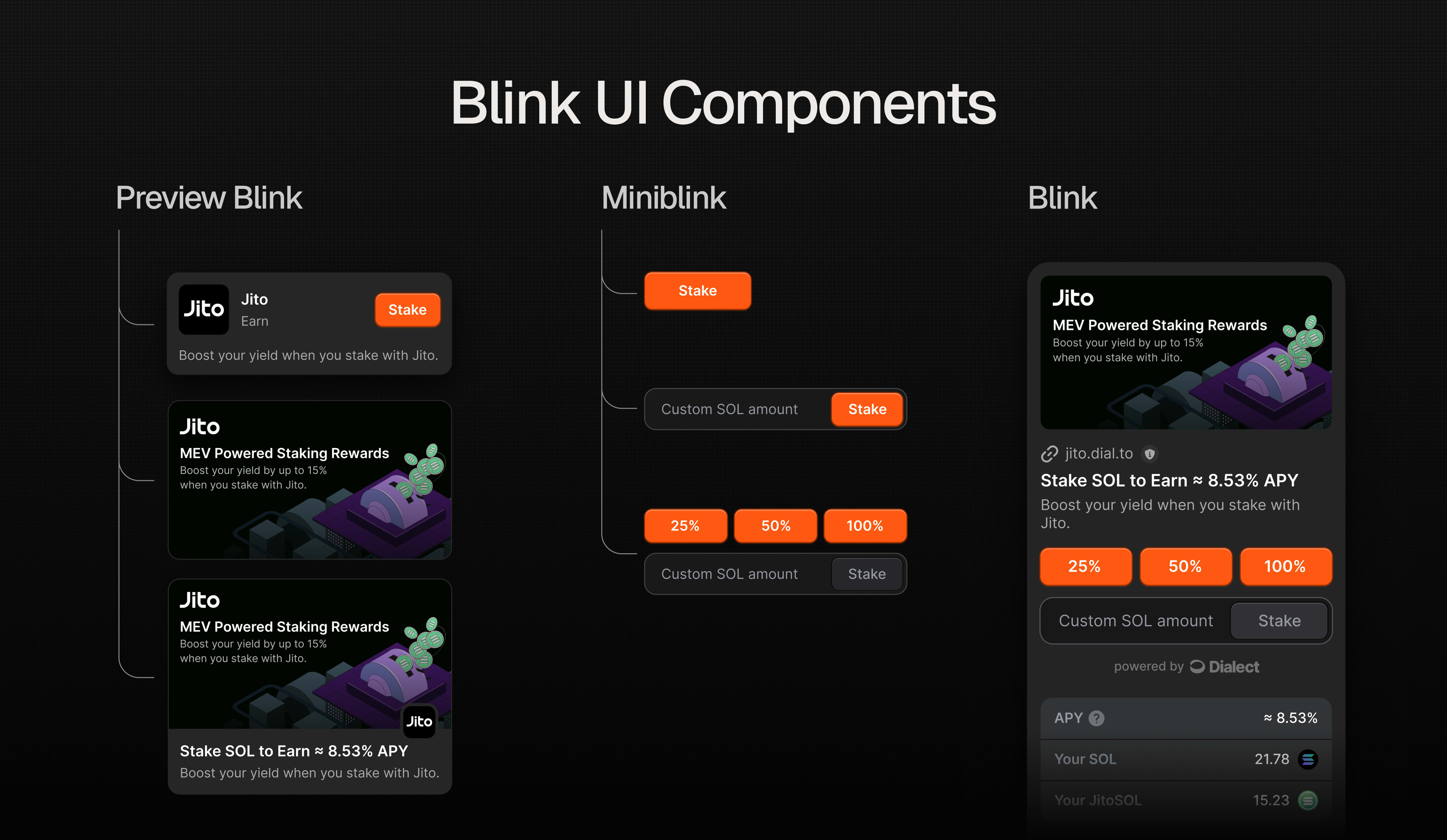 The `BlinkPreview` allows you to display a preview version of the blink with its own title, description, and image. It can be used for marketing purposes or in cases where you only want to render a preview without needing the full blink data.
The `Blink` endpoint contains all blink-related data, including its actions and the BlinkPreview. Use this API when you plan to interact with the blink.
**It is highly recommended to use the Dialect API when fetching a blink to benefit from all the additional features our SaaS platform offers.**
In the following example, we'll use the stake blink from Jito to guide you through the different API requests.
### `GET` Requests
The `GET` endpoint returns a `JSON` object that renders the blink or provides blink-relevant data, such as the `BlinkDataTable`.
#### Fetching a `Blink`
A `Blink` contains the complete, interactive data structure. It includes all necessary information to display and interact with a `Blink`, including its current state, possible actions, and related data.
This is the primary structure you'll work with when implementing blink functionality in your application.
The `BlinkPreview` allows you to display a preview version of the blink with its own title, description, and image. It can be used for marketing purposes or in cases where you only want to render a preview without needing the full blink data.
The `Blink` endpoint contains all blink-related data, including its actions and the BlinkPreview. Use this API when you plan to interact with the blink.
**It is highly recommended to use the Dialect API when fetching a blink to benefit from all the additional features our SaaS platform offers.**
In the following example, we'll use the stake blink from Jito to guide you through the different API requests.
### `GET` Requests
The `GET` endpoint returns a `JSON` object that renders the blink or provides blink-relevant data, such as the `BlinkDataTable`.
#### Fetching a `Blink`
A `Blink` contains the complete, interactive data structure. It includes all necessary information to display and interact with a `Blink`, including its current state, possible actions, and related data.
This is the primary structure you'll work with when implementing blink functionality in your application.
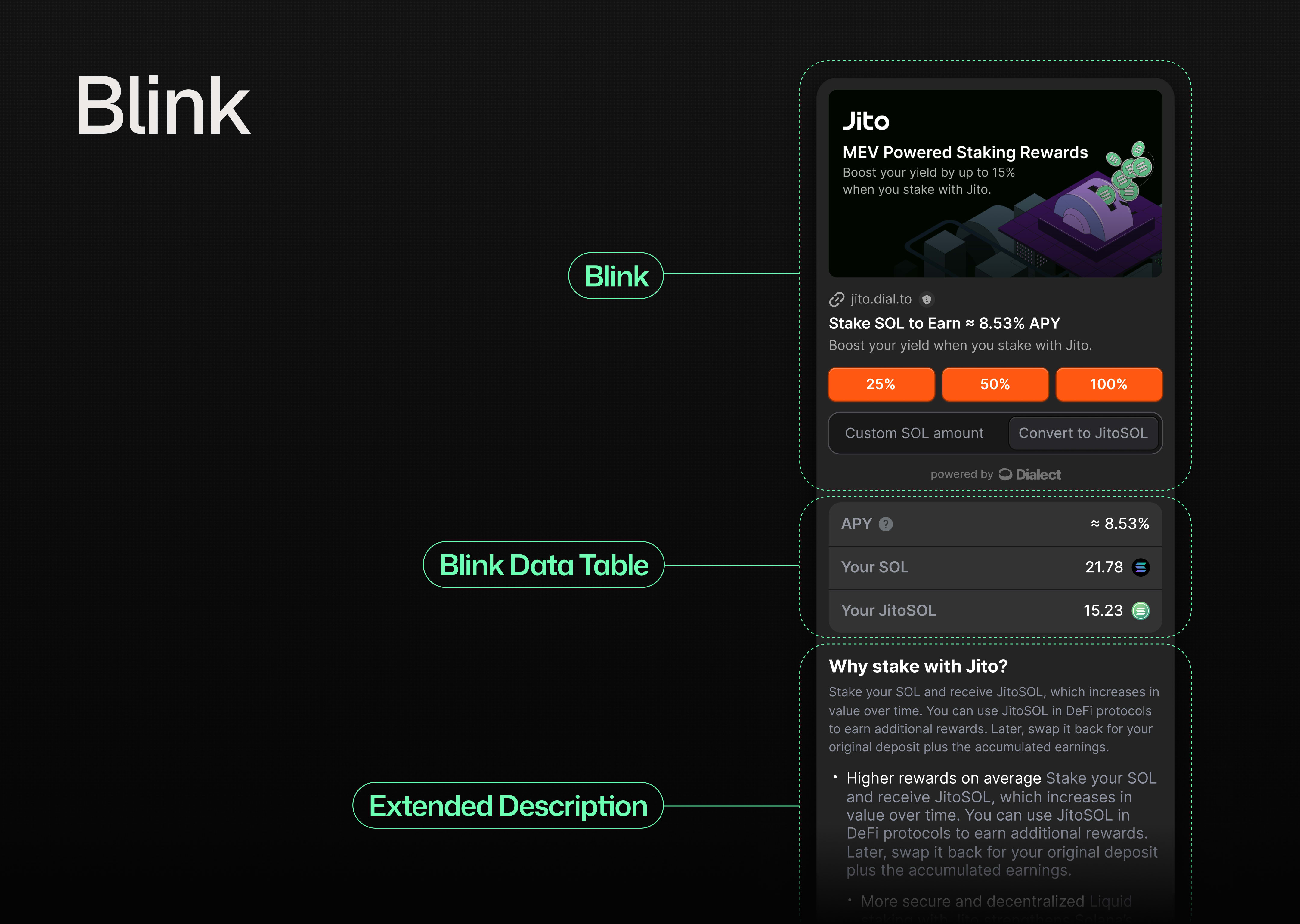 There are no strict requirements for image dimensions, but we recommend using either 16:9 or 1:1 aspect ratios.
```bash theme={null}
# CURL example to fetch a blink
# Note: The X-Blink-Client-Key header is optional but recommended
curl 'https://api.dial.to/v1/blink?apiUrl=https%3A%2F%2Fjito.dial.to%2Fstake' \
--header 'X-Blink-Client-Key: YOUR_SECRET_TOKEN'
```
The above command will return a `JSON` object that can be used to render the blink.
```json theme={null}
{
"type": "action",
"icon": "https://imagedelivery.net/C7jfNnfrjpAYWW6YevrFDg/6cc758de-394c-466f-15ee-295224bc8300/public",
"label": "Convert to JitoSOL",
"title": "Stake SOL to Earn ≈ 8.56% APY",
"description": "Boost your yield when you stake with Jito.",
"links": {
"actions": [
{
"type": "transaction",
"label": "25%",
"href": "https://api.dial.to/v1/blink?apiUrl=https%3A%2F%2Fjito.dial.to%2Fstake%2Fpercentage%2F25%3F_bin%3D83308537-b8a4-4225-acd7-9269d79940a7"
},
{
"type": "transaction",
"label": "50%",
"href": "https://api.dial.to/v1/blink?apiUrl=https%3A%2F%2Fjito.dial.to%2Fstake%2Fpercentage%2F50%3F_bin%3D83308537-b8a4-4225-acd7-9269d79940a7"
},
{
"type": "transaction",
"label": "100%",
"href": "https://api.dial.to/v1/blink?apiUrl=https%3A%2F%2Fjito.dial.to%2Fstake%2Fpercentage%2F100%3F_bin%3D83308537-b8a4-4225-acd7-9269d79940a7"
},
{
"type": "transaction",
"href": "https://api.dial.to/v1/blink?apiUrl=https%3A%2F%2Fjito.dial.to%2Fstake%2Famount%2F{amount}%3F_bin%3D83308537-b8a4-4225-acd7-9269d79940a7",
"label": "Convert to JitoSOL",
"parameters": [
{
"name": "amount",
"label": "Custom SOL amount"
}
]
}
],
"dataTable": "https://api.dial.to/v1/blink-data-table?apiUrl=https%3A%2F%2Fjito.dial.to%2Fstake%3F_bin%3D83308537-b8a4-4225-acd7-9269d79940a7"
},
"context": {
"category": "Liquid Staking Token",
"url": "https://jito.dial.to/stake?_bin=83308537-b8a4-4225-acd7-9269d79940a7",
"websiteUrl": "https://jito.network",
"provider": {
"name": "Jito",
"icon": "https://imagedelivery.net/C7jfNnfrjpAYWW6YevrFDg/59ed70c8-7fe7-437f-a149-a1ef3eb02500/public"
}
},
"preview": {
"title": "Stake SOL to Earn",
"description": "Boost your yield when you stake with Jito.",
"image": "https://imagedelivery.net/C7jfNnfrjpAYWW6YevrFDg/6cc758de-394c-466f-15ee-295224bc8300/public",
"cta": "Stake",
"context": {
"category": "Liquid Staking Token",
"url": "https://jito.dial.to/stake?_bin=83308537-b8a4-4225-acd7-9269d79940a7",
"websiteUrl": "https://jito.network",
"provider": {
"name": "Jito",
"icon": "https://imagedelivery.net/C7jfNnfrjpAYWW6YevrFDg/59ed70c8-7fe7-437f-a149-a1ef3eb02500/public"
}
}
},
"extendedDescription": "## Why stake with Jito?\nStake your SOL and receive JitoSOL, which increases in value over time. You can use JitoSOL in DeFi protocols to earn additional rewards. Later, swap it back for your original deposit plus the accumulated earnings. \n\n- **Higher rewards on average** Stake your SOL and receive JitoSOL, which increases in value over time. You can use JitoSOL in DeFi protocols to earn additional rewards. Later, swap it back for your original deposit plus the accumulated earnings.\n- **More secure and decentralized** Liquid staking with Jito strengthens Solana's network by distributing stakes across multiple validators, lowering the risk associated with validators that have low uptime."
}
```
To see the full data schema and test your API requests, checkout our [Blink API](https://api.dial.to/docs#tag/blink/GET/v1/blink) doc.
#### Fetching a `BlinkDataTable`
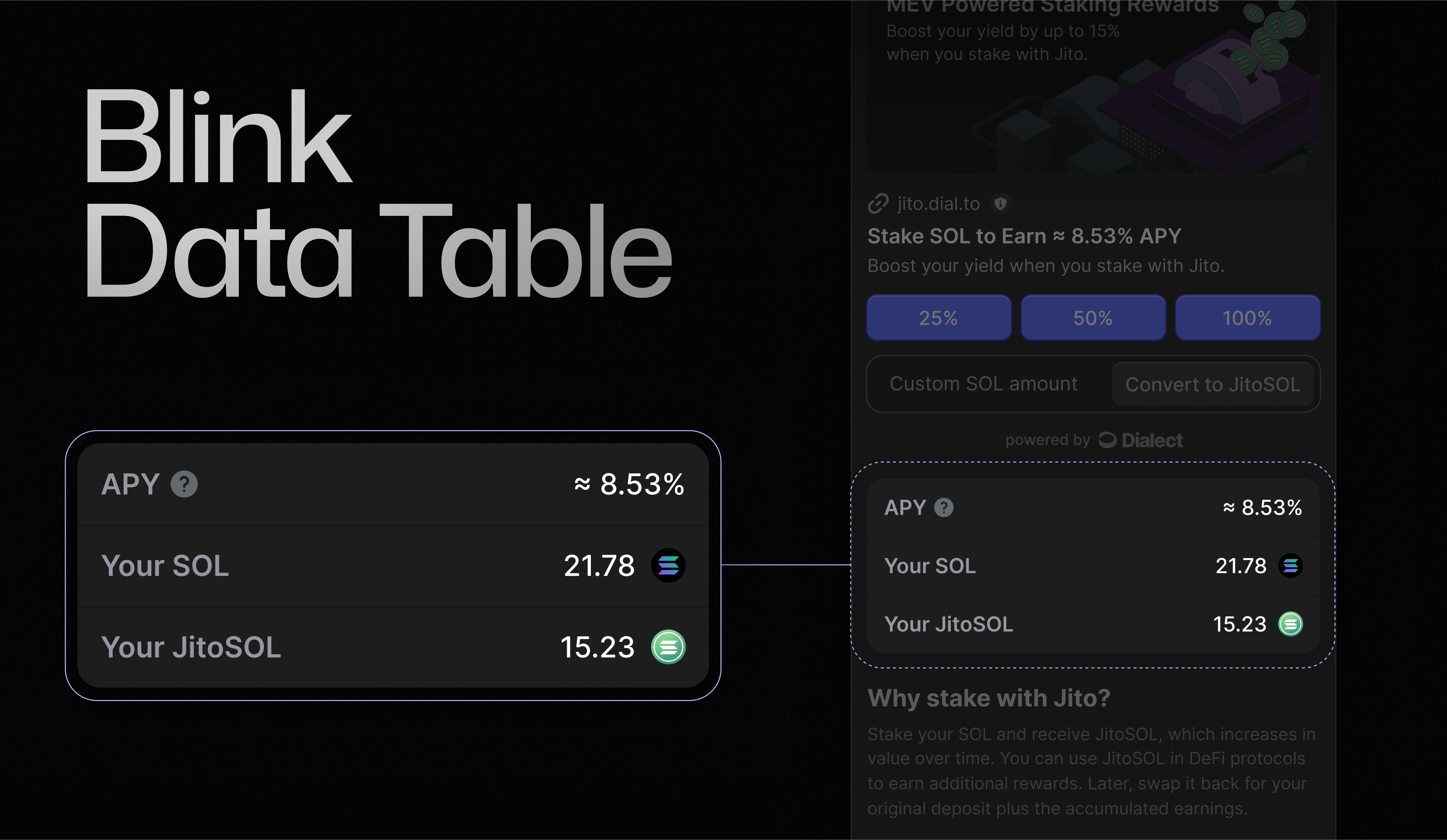
In addition to the `Blink` and `BlinkPreview` endpoints, we offer a `BlinkDataTable` endpoint. This can be used to highlight important information for your users, such as APY or balances.
Because `BlinkDataTables` are often compute-intensive, they have their own endpoint. This separation allows you to fetch them only when needed.
There are no strict requirements for image dimensions, but we recommend using either 16:9 or 1:1 aspect ratios.
```bash theme={null}
# CURL example to fetch a blink
# Note: The X-Blink-Client-Key header is optional but recommended
curl 'https://api.dial.to/v1/blink?apiUrl=https%3A%2F%2Fjito.dial.to%2Fstake' \
--header 'X-Blink-Client-Key: YOUR_SECRET_TOKEN'
```
The above command will return a `JSON` object that can be used to render the blink.
```json theme={null}
{
"type": "action",
"icon": "https://imagedelivery.net/C7jfNnfrjpAYWW6YevrFDg/6cc758de-394c-466f-15ee-295224bc8300/public",
"label": "Convert to JitoSOL",
"title": "Stake SOL to Earn ≈ 8.56% APY",
"description": "Boost your yield when you stake with Jito.",
"links": {
"actions": [
{
"type": "transaction",
"label": "25%",
"href": "https://api.dial.to/v1/blink?apiUrl=https%3A%2F%2Fjito.dial.to%2Fstake%2Fpercentage%2F25%3F_bin%3D83308537-b8a4-4225-acd7-9269d79940a7"
},
{
"type": "transaction",
"label": "50%",
"href": "https://api.dial.to/v1/blink?apiUrl=https%3A%2F%2Fjito.dial.to%2Fstake%2Fpercentage%2F50%3F_bin%3D83308537-b8a4-4225-acd7-9269d79940a7"
},
{
"type": "transaction",
"label": "100%",
"href": "https://api.dial.to/v1/blink?apiUrl=https%3A%2F%2Fjito.dial.to%2Fstake%2Fpercentage%2F100%3F_bin%3D83308537-b8a4-4225-acd7-9269d79940a7"
},
{
"type": "transaction",
"href": "https://api.dial.to/v1/blink?apiUrl=https%3A%2F%2Fjito.dial.to%2Fstake%2Famount%2F{amount}%3F_bin%3D83308537-b8a4-4225-acd7-9269d79940a7",
"label": "Convert to JitoSOL",
"parameters": [
{
"name": "amount",
"label": "Custom SOL amount"
}
]
}
],
"dataTable": "https://api.dial.to/v1/blink-data-table?apiUrl=https%3A%2F%2Fjito.dial.to%2Fstake%3F_bin%3D83308537-b8a4-4225-acd7-9269d79940a7"
},
"context": {
"category": "Liquid Staking Token",
"url": "https://jito.dial.to/stake?_bin=83308537-b8a4-4225-acd7-9269d79940a7",
"websiteUrl": "https://jito.network",
"provider": {
"name": "Jito",
"icon": "https://imagedelivery.net/C7jfNnfrjpAYWW6YevrFDg/59ed70c8-7fe7-437f-a149-a1ef3eb02500/public"
}
},
"preview": {
"title": "Stake SOL to Earn",
"description": "Boost your yield when you stake with Jito.",
"image": "https://imagedelivery.net/C7jfNnfrjpAYWW6YevrFDg/6cc758de-394c-466f-15ee-295224bc8300/public",
"cta": "Stake",
"context": {
"category": "Liquid Staking Token",
"url": "https://jito.dial.to/stake?_bin=83308537-b8a4-4225-acd7-9269d79940a7",
"websiteUrl": "https://jito.network",
"provider": {
"name": "Jito",
"icon": "https://imagedelivery.net/C7jfNnfrjpAYWW6YevrFDg/59ed70c8-7fe7-437f-a149-a1ef3eb02500/public"
}
}
},
"extendedDescription": "## Why stake with Jito?\nStake your SOL and receive JitoSOL, which increases in value over time. You can use JitoSOL in DeFi protocols to earn additional rewards. Later, swap it back for your original deposit plus the accumulated earnings. \n\n- **Higher rewards on average** Stake your SOL and receive JitoSOL, which increases in value over time. You can use JitoSOL in DeFi protocols to earn additional rewards. Later, swap it back for your original deposit plus the accumulated earnings.\n- **More secure and decentralized** Liquid staking with Jito strengthens Solana's network by distributing stakes across multiple validators, lowering the risk associated with validators that have low uptime."
}
```
To see the full data schema and test your API requests, checkout our [Blink API](https://api.dial.to/docs#tag/blink/GET/v1/blink) doc.
#### Fetching a `BlinkDataTable`
In addition to the `Blink` and `BlinkPreview` endpoints, we offer a `BlinkDataTable` endpoint. This can be used to highlight important information for your users, such as APY or balances.
Because `BlinkDataTables` are often compute-intensive, they have their own endpoint. This separation allows you to fetch them only when needed.
 ```bash theme={null}
# CURL example to fetch a data table
# Note: The X-Blink-Client-Key header is optional but recommended
curl 'https://api.dial.to/v1/blink-data-table?apiUrl=https%3A%2F%2Fjito.dial.to%2Fstake' \
--header 'X-Blink-Client-Key: YOUR_SECRET_TOKEN'
```
```json theme={null}
{
"rows": [
{
"key": "apy",
"title": "APY",
"value": "8.56%"
},
{
"key": "rate",
"title": "Rate",
"value": "1 JitoSOL ≈ 1.18 SOL"
}
],
"links": {
"blink": "https://api.dial.to/v1/blink?apiUrl=https%3A%2F%2Fjito.dial.to%2Fstake%3F_bin%3D83308537-b8a4-4225-acd7-9269d79940a7",
"preview": "https://api.dial.to/v1/blink-preview?apiUrl=https%3A%2F%2Fjito.dial.to%2Fstake%3F_bin%3D83308537-b8a4-4225-acd7-9269d79940a7"
},
"context": {
"category": "Liquid Staking Token",
"url": "https://jito.dial.to/stake?_bin=83308537-b8a4-4225-acd7-9269d79940a7",
"websiteUrl": "https://jito.network",
"provider": {
"name": "Jito",
"icon": "https://imagedelivery.net/C7jfNnfrjpAYWW6YevrFDg/59ed70c8-7fe7-437f-a149-a1ef3eb02500/public"
}
}
}
```
To see the full data schema and test your API requests, checkout our [BlinkDataTable API](https://api.dial.to/docs#tag/blink-data-table) docs.
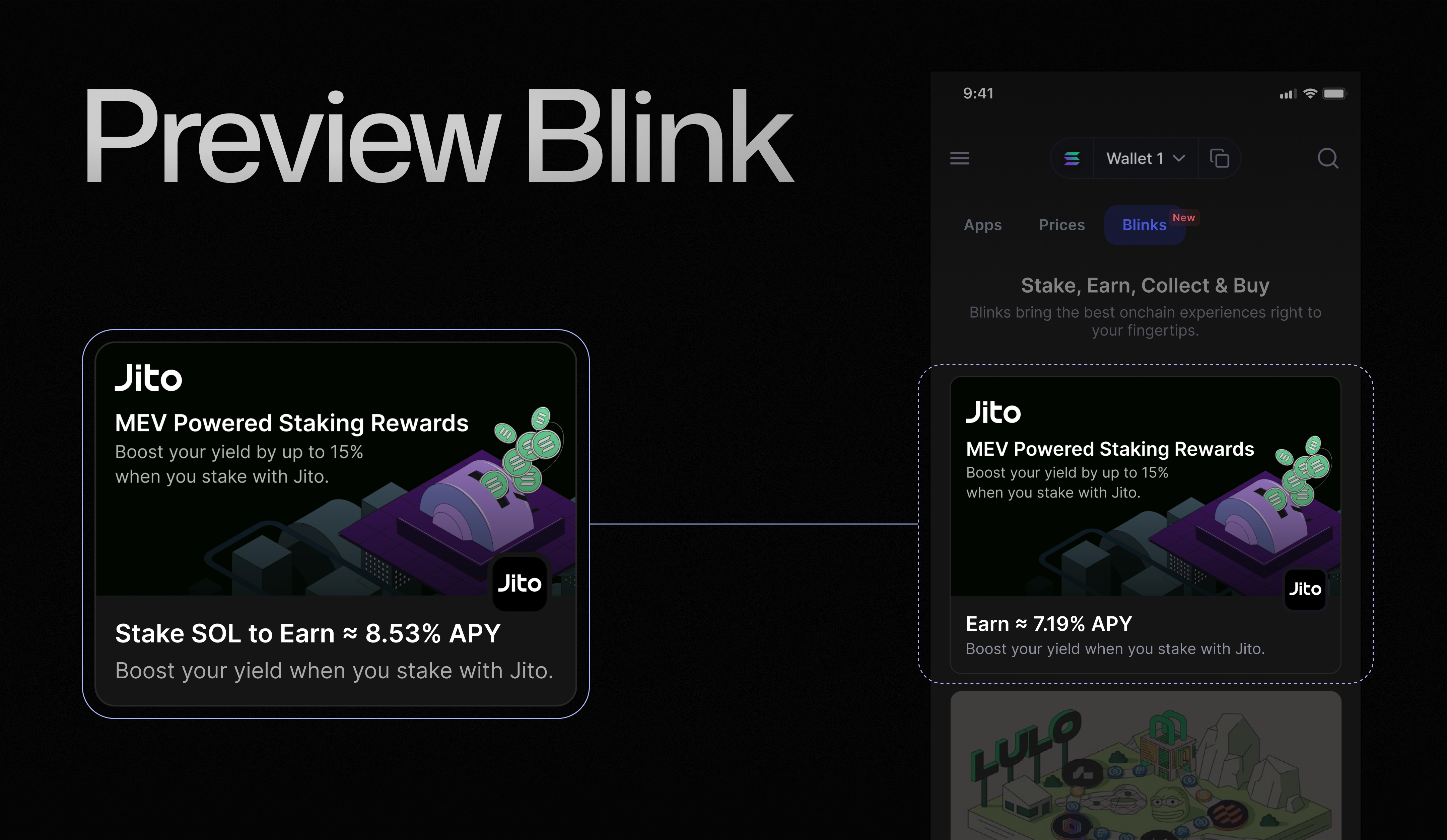
#### Fetching a `BlinkPreview`
`BlinkPreview` is a small, static set of data used to display relevant information about the blink. Consider it an opportunity to use marketing language and render a preview instead of the full blink - useful for lists or websites that don't yet unfurl blinks.
It is recommended to use a separate 16:9 image for this preview.
```bash theme={null}
# CURL example to fetch a data table
# Note: The X-Blink-Client-Key header is optional but recommended
curl 'https://api.dial.to/v1/blink-data-table?apiUrl=https%3A%2F%2Fjito.dial.to%2Fstake' \
--header 'X-Blink-Client-Key: YOUR_SECRET_TOKEN'
```
```json theme={null}
{
"rows": [
{
"key": "apy",
"title": "APY",
"value": "8.56%"
},
{
"key": "rate",
"title": "Rate",
"value": "1 JitoSOL ≈ 1.18 SOL"
}
],
"links": {
"blink": "https://api.dial.to/v1/blink?apiUrl=https%3A%2F%2Fjito.dial.to%2Fstake%3F_bin%3D83308537-b8a4-4225-acd7-9269d79940a7",
"preview": "https://api.dial.to/v1/blink-preview?apiUrl=https%3A%2F%2Fjito.dial.to%2Fstake%3F_bin%3D83308537-b8a4-4225-acd7-9269d79940a7"
},
"context": {
"category": "Liquid Staking Token",
"url": "https://jito.dial.to/stake?_bin=83308537-b8a4-4225-acd7-9269d79940a7",
"websiteUrl": "https://jito.network",
"provider": {
"name": "Jito",
"icon": "https://imagedelivery.net/C7jfNnfrjpAYWW6YevrFDg/59ed70c8-7fe7-437f-a149-a1ef3eb02500/public"
}
}
}
```
To see the full data schema and test your API requests, checkout our [BlinkDataTable API](https://api.dial.to/docs#tag/blink-data-table) docs.
#### Fetching a `BlinkPreview`
`BlinkPreview` is a small, static set of data used to display relevant information about the blink. Consider it an opportunity to use marketing language and render a preview instead of the full blink - useful for lists or websites that don't yet unfurl blinks.
It is recommended to use a separate 16:9 image for this preview.
 ```bash theme={null}
# CURL example to fetch a blink preview
# Note: The X-Blink-Client-Key header is optional but recommended
curl 'https://api.dial.to/v1/blink-preview?apiUrl=https%3A%2F%2Fjito.dial.to%2Fstake' \
--header 'X-Blink-Client-Key: YOUR_SECRET_TOKEN'
```
```json theme={null}
{
"title": "Stake SOL to Earn",
"description": "Boost your yield when you stake with Jito.",
"image": "https://imagedelivery.net/C7jfNnfrjpAYWW6YevrFDg/6cc758de-394c-466f-15ee-295224bc8300/public",
"cta": "Stake",
"context": {
"category": "Liquid Staking Token",
"url": "https://jito.dial.to/stake?_bin=83308537-b8a4-4225-acd7-9269d79940a7",
"websiteUrl": "https://jito.network",
"provider": {
"name": "Jito",
"icon": "https://imagedelivery.net/C7jfNnfrjpAYWW6YevrFDg/59ed70c8-7fe7-437f-a149-a1ef3eb02500/public"
}
},
"links": {
"blink": "https://api.dial.to/v1/blink?apiUrl=https%3A%2F%2Fjito.dial.to%2Fstake%3F_bin%3D83308537-b8a4-4225-acd7-9269d79940a7",
"dataTable": "https://api.dial.to/v1/blink-data-table?apiUrl=https%3A%2F%2Fjito.dial.to%2Fstake%3F_bin%3D83308537-b8a4-4225-acd7-9269d79940a7"
}
}
```
To see the full data schema and test your API requests, checkout our [BlinkPreview API](https://api.dial.to/docs#tag/blink-preview/GET/v1/blink-preview) docs.
### `POST` requests
Once a user clicks on a button, the blink will send a POST request to your backend. This request always contains the wallet address (account) of the user. Additional data can be sent via the URL, e.g., by using URL parameters.
Example URL for POST: `https://jito.dial.to/stake/percentage/25`
In this blink, we use our example from the Jito staking blink again. Please note that the URL has changed from `/stake` (GET endpoint) to `/stake/percentage` (POST endpoint). The number 25 indicates that 25% of the user's SOL balance will be staked.
There are no specific requirements for the design of your link structure or endpoints. Most blinks use the same endpoint for their GET and POST requests and utilize URL parameters to add extra values.
```bash theme={null}
# CURL example of a blink POST request
# Note: The X-Blink-Client-Key header is optional but recommended
curl 'https://api.dial.to/v1/blink?apiUrl=https%3A%2F%2Fjito.dial.to%2Fstake%2Fpercentage%2F25' \
--request POST \
--header 'Content-Type: application/json' \
--header 'X-Blink-Client-Key: YOUR_SECRET_TOKEN' \
--data '{
"type": "transaction",
"account": "YOUR_WALLET_ADDRESS"
}'
```
If everything is correct, the blink provider will send a transaction to the frontend that can be signed by the user.
Creating a ready-to-sign transaction in the backend and sending this transaction to the frontend is one of the superpowers of building with blinks. This approach gives blink builders the power to implement their services in the way they know works best, thereby:
* Reducing the chances of incorrect implementations
* Providing a single point of maintenance
* Ensuring full control over the blink
Blink clients who want to integrate new services for their users can simply fetch a blink, eliminating the need for client-side SDKs or complex implementation scenarios.
Blinks are also the preferred way for teams who want to integrate their services into AI agent kits.
The blink provider from the example above will return the following JSON:
```json theme={null}
{
"type": "transaction",
"transaction": "AgAAAAAAAAAAAAAAAAAAAAAAAAAAAAAAAAAAAAAAAAAAAAAAAAAAAAAAAAAAAAAAAAAAAAAAAAAAAAAAAAAAAAD4knXJvK4GgcN8HYwIVt6A8NrRxNXjC5mFEnmwb792Qix9U/nPzDt3Z/Vnlk91cpfThQNi9pfbCuGivaWm4+sAgAIACA9XZuSyYgzMaVVNxyidlVd0xIghrnt1V1Ew/3RDhg7zzEKSLPDzeRJEULXXPQDyPnR1Y9zFMLVG2mZPp8vNsNaUhSx40kphsfcZUjodpnaevz9/Klx/uuv1NoS2sqRRvQ780UHpgyyvEK2RdJXKDycbWyk81HAn6nNwB+1A6zmgvQSKPgjDtJW+F/RUJ9ib7FuAx+JpXBhk12dD2zm+00bWnqdo/t9kTIqum44hiK3Qa8VQ+/cWyCK5zmPHeD2VLh8J5qP+7PmQMuHB32uXItyzY057jjRAk2vDSwzByOtSHwMGRm/lIRcy/+ytunLDm+e8jOW7xfcSayxDmzpAAAAAAAAAAAAAAAAAAAAAAAAAAAAAAAAAAAAAAAAAAAAAAACMlyWPTiSJ8bs9ECkUjg2DC1oTmdr/EIQEjnvY2+n4WQbd9uHXZaGT2cvhRs7reawctIXtX1s3kTqM9YV+/wCpBoFO1Mr2ihdGcv2shgMaY+hOoV76HUS3IpP229sAFlBU5Z4kwFGooUp7HpeX8OEs36dJAhZlMZWmpRKm8WZgKwu8D8C7R8ovdMQRLpSrE8+jxjTl3BfqywPNGiPNfnh8JSDzG2mhpKm2CAy/ETfbs0d85ZDqeBK+3Jhsm/SZ7/fJXGOTQWmZ5fiSAUZMu8ODn5nPNLKk0UpjcoeM/H5gcwUHAAkDIJpNAAAAAAAIAgABDAIAAAA4UU0AAAAAAAkGAAIAAwgKAQELCgQMBQECBgIDCAoJDjhRTQAAAAAADQEOBWJsaW5rAA==",
"dialectExperimental": {
"reference": "3VwE64hHjQS4oBGXyWuWSe1jx8gfnDiy1PvfFLV3pbBt"
}
}
```
To see the full data schema and test your API requests, checkout our [Blink POST API](https://api.dial.to/docs#tag/blink/POST/v1/blink) docs.
### Multi-Step Blinks: Action Chaining
```bash theme={null}
# CURL example to fetch a blink preview
# Note: The X-Blink-Client-Key header is optional but recommended
curl 'https://api.dial.to/v1/blink-preview?apiUrl=https%3A%2F%2Fjito.dial.to%2Fstake' \
--header 'X-Blink-Client-Key: YOUR_SECRET_TOKEN'
```
```json theme={null}
{
"title": "Stake SOL to Earn",
"description": "Boost your yield when you stake with Jito.",
"image": "https://imagedelivery.net/C7jfNnfrjpAYWW6YevrFDg/6cc758de-394c-466f-15ee-295224bc8300/public",
"cta": "Stake",
"context": {
"category": "Liquid Staking Token",
"url": "https://jito.dial.to/stake?_bin=83308537-b8a4-4225-acd7-9269d79940a7",
"websiteUrl": "https://jito.network",
"provider": {
"name": "Jito",
"icon": "https://imagedelivery.net/C7jfNnfrjpAYWW6YevrFDg/59ed70c8-7fe7-437f-a149-a1ef3eb02500/public"
}
},
"links": {
"blink": "https://api.dial.to/v1/blink?apiUrl=https%3A%2F%2Fjito.dial.to%2Fstake%3F_bin%3D83308537-b8a4-4225-acd7-9269d79940a7",
"dataTable": "https://api.dial.to/v1/blink-data-table?apiUrl=https%3A%2F%2Fjito.dial.to%2Fstake%3F_bin%3D83308537-b8a4-4225-acd7-9269d79940a7"
}
}
```
To see the full data schema and test your API requests, checkout our [BlinkPreview API](https://api.dial.to/docs#tag/blink-preview/GET/v1/blink-preview) docs.
### `POST` requests
Once a user clicks on a button, the blink will send a POST request to your backend. This request always contains the wallet address (account) of the user. Additional data can be sent via the URL, e.g., by using URL parameters.
Example URL for POST: `https://jito.dial.to/stake/percentage/25`
In this blink, we use our example from the Jito staking blink again. Please note that the URL has changed from `/stake` (GET endpoint) to `/stake/percentage` (POST endpoint). The number 25 indicates that 25% of the user's SOL balance will be staked.
There are no specific requirements for the design of your link structure or endpoints. Most blinks use the same endpoint for their GET and POST requests and utilize URL parameters to add extra values.
```bash theme={null}
# CURL example of a blink POST request
# Note: The X-Blink-Client-Key header is optional but recommended
curl 'https://api.dial.to/v1/blink?apiUrl=https%3A%2F%2Fjito.dial.to%2Fstake%2Fpercentage%2F25' \
--request POST \
--header 'Content-Type: application/json' \
--header 'X-Blink-Client-Key: YOUR_SECRET_TOKEN' \
--data '{
"type": "transaction",
"account": "YOUR_WALLET_ADDRESS"
}'
```
If everything is correct, the blink provider will send a transaction to the frontend that can be signed by the user.
Creating a ready-to-sign transaction in the backend and sending this transaction to the frontend is one of the superpowers of building with blinks. This approach gives blink builders the power to implement their services in the way they know works best, thereby:
* Reducing the chances of incorrect implementations
* Providing a single point of maintenance
* Ensuring full control over the blink
Blink clients who want to integrate new services for their users can simply fetch a blink, eliminating the need for client-side SDKs or complex implementation scenarios.
Blinks are also the preferred way for teams who want to integrate their services into AI agent kits.
The blink provider from the example above will return the following JSON:
```json theme={null}
{
"type": "transaction",
"transaction": "AgAAAAAAAAAAAAAAAAAAAAAAAAAAAAAAAAAAAAAAAAAAAAAAAAAAAAAAAAAAAAAAAAAAAAAAAAAAAAAAAAAAAAD4knXJvK4GgcN8HYwIVt6A8NrRxNXjC5mFEnmwb792Qix9U/nPzDt3Z/Vnlk91cpfThQNi9pfbCuGivaWm4+sAgAIACA9XZuSyYgzMaVVNxyidlVd0xIghrnt1V1Ew/3RDhg7zzEKSLPDzeRJEULXXPQDyPnR1Y9zFMLVG2mZPp8vNsNaUhSx40kphsfcZUjodpnaevz9/Klx/uuv1NoS2sqRRvQ780UHpgyyvEK2RdJXKDycbWyk81HAn6nNwB+1A6zmgvQSKPgjDtJW+F/RUJ9ib7FuAx+JpXBhk12dD2zm+00bWnqdo/t9kTIqum44hiK3Qa8VQ+/cWyCK5zmPHeD2VLh8J5qP+7PmQMuHB32uXItyzY057jjRAk2vDSwzByOtSHwMGRm/lIRcy/+ytunLDm+e8jOW7xfcSayxDmzpAAAAAAAAAAAAAAAAAAAAAAAAAAAAAAAAAAAAAAAAAAAAAAACMlyWPTiSJ8bs9ECkUjg2DC1oTmdr/EIQEjnvY2+n4WQbd9uHXZaGT2cvhRs7reawctIXtX1s3kTqM9YV+/wCpBoFO1Mr2ihdGcv2shgMaY+hOoV76HUS3IpP229sAFlBU5Z4kwFGooUp7HpeX8OEs36dJAhZlMZWmpRKm8WZgKwu8D8C7R8ovdMQRLpSrE8+jxjTl3BfqywPNGiPNfnh8JSDzG2mhpKm2CAy/ETfbs0d85ZDqeBK+3Jhsm/SZ7/fJXGOTQWmZ5fiSAUZMu8ODn5nPNLKk0UpjcoeM/H5gcwUHAAkDIJpNAAAAAAAIAgABDAIAAAA4UU0AAAAAAAkGAAIAAwgKAQELCgQMBQECBgIDCAoJDjhRTQAAAAAADQEOBWJsaW5rAA==",
"dialectExperimental": {
"reference": "3VwE64hHjQS4oBGXyWuWSe1jx8gfnDiy1PvfFLV3pbBt"
}
}
```
To see the full data schema and test your API requests, checkout our [Blink POST API](https://api.dial.to/docs#tag/blink/POST/v1/blink) docs.
### Multi-Step Blinks: Action Chaining
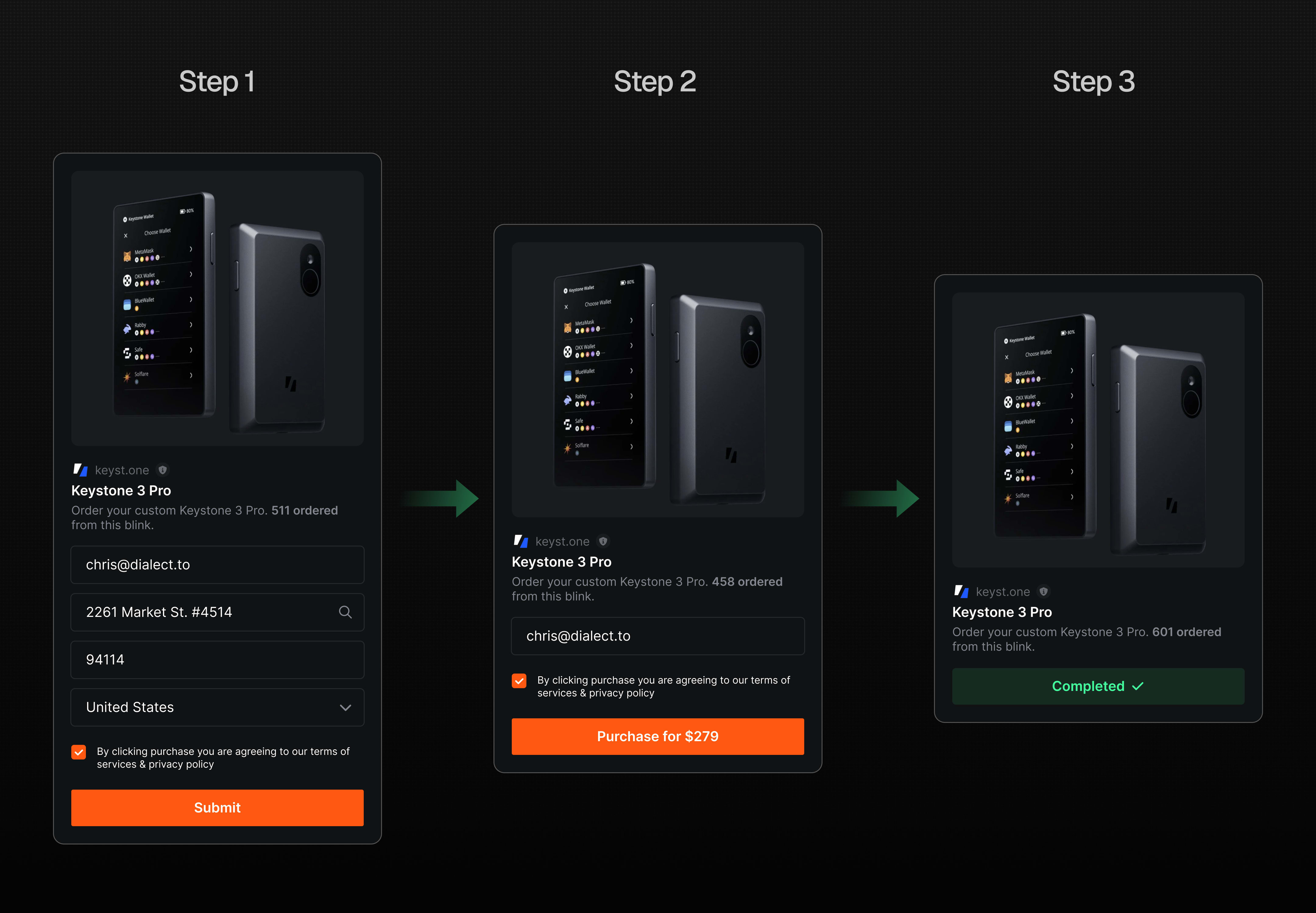 Action Chaining allows you to create complex workflows by connecting multiple blink actions in a sequential order. Instead of handling single, isolated actions, you can orchestrate a series of interconnected steps to create more complex user experiences.
Our SDKs are the recommended way to implement action chaining as they handle the complexity for you.
### Handling Multiple Transactions (Experimental)
**Experimental Feature**: Multiple transactions are not part of the official Solana Actions specification and are not supported by Dialect's official Blinks libraries. This is an experimental extension for specific use cases that require multiple transactions to be executed.
Some complex DeFi operations require multiple transactions to be executed sequentially. When a blink provider needs to return multiple transactions, the response will use `type: "transactions"` instead of `type: "transaction"`:
```json theme={null}
{
"type": "transactions",
"transactions": [
"transaction_1",
"transaction_2",
"transaction_3"
],
"mode": "sequential",
"dialectExperimental": {
"reference": "transaction_reference_id"
}
}
```
**Implementation Requirements**
When handling multiple transactions, clients must:
1. **Execute sequentially**: Sign and submit each transaction in order, waiting for confirmation before proceeding
2. **Update cache** (recommended): Refresh account state and balances between transactions to ensure accurate data
3. **Handle confirmations**: Wait for each transaction to be confirmed on-chain before signing the next
4. **Update Blockhash**: Fetch a fresh recent blockhash before signing the next transaction
5. **Manage failures**: If any transaction fails, stop the sequence and handle the error appropriately
Transaction signing is the client's responsibility. Dialect provides the transactions ready for signing, but implementing wallet interaction and signature collection is handled by your application using standard Solana libraries such as `@solana/web3.js`, `@solana/kit`, or `gill`. (Single transactions can be handled by the blink client directly)
For more details on how providers implement multiple transactions, see the [provider documentation](/blinks/blinks-provider/advanced/multiple-transactions).
### Input types
Blinks can be more than just one-click button actions. In fact, they can become really powerful when you add multiple inputs.
If you look at our [Standard Blinks Library (SBL)](/standard-blinks-library), you will find many blinks that feature radio buttons, dropdown menus, checkboxes, and much more. This allows you to build full-fledged forms or even games that run entirely on blinks.
Action Chaining allows you to create complex workflows by connecting multiple blink actions in a sequential order. Instead of handling single, isolated actions, you can orchestrate a series of interconnected steps to create more complex user experiences.
Our SDKs are the recommended way to implement action chaining as they handle the complexity for you.
### Handling Multiple Transactions (Experimental)
**Experimental Feature**: Multiple transactions are not part of the official Solana Actions specification and are not supported by Dialect's official Blinks libraries. This is an experimental extension for specific use cases that require multiple transactions to be executed.
Some complex DeFi operations require multiple transactions to be executed sequentially. When a blink provider needs to return multiple transactions, the response will use `type: "transactions"` instead of `type: "transaction"`:
```json theme={null}
{
"type": "transactions",
"transactions": [
"transaction_1",
"transaction_2",
"transaction_3"
],
"mode": "sequential",
"dialectExperimental": {
"reference": "transaction_reference_id"
}
}
```
**Implementation Requirements**
When handling multiple transactions, clients must:
1. **Execute sequentially**: Sign and submit each transaction in order, waiting for confirmation before proceeding
2. **Update cache** (recommended): Refresh account state and balances between transactions to ensure accurate data
3. **Handle confirmations**: Wait for each transaction to be confirmed on-chain before signing the next
4. **Update Blockhash**: Fetch a fresh recent blockhash before signing the next transaction
5. **Manage failures**: If any transaction fails, stop the sequence and handle the error appropriately
Transaction signing is the client's responsibility. Dialect provides the transactions ready for signing, but implementing wallet interaction and signature collection is handled by your application using standard Solana libraries such as `@solana/web3.js`, `@solana/kit`, or `gill`. (Single transactions can be handled by the blink client directly)
For more details on how providers implement multiple transactions, see the [provider documentation](/blinks/blinks-provider/advanced/multiple-transactions).
### Input types
Blinks can be more than just one-click button actions. In fact, they can become really powerful when you add multiple inputs.
If you look at our [Standard Blinks Library (SBL)](/standard-blinks-library), you will find many blinks that feature radio buttons, dropdown menus, checkboxes, and much more. This allows you to build full-fledged forms or even games that run entirely on blinks.
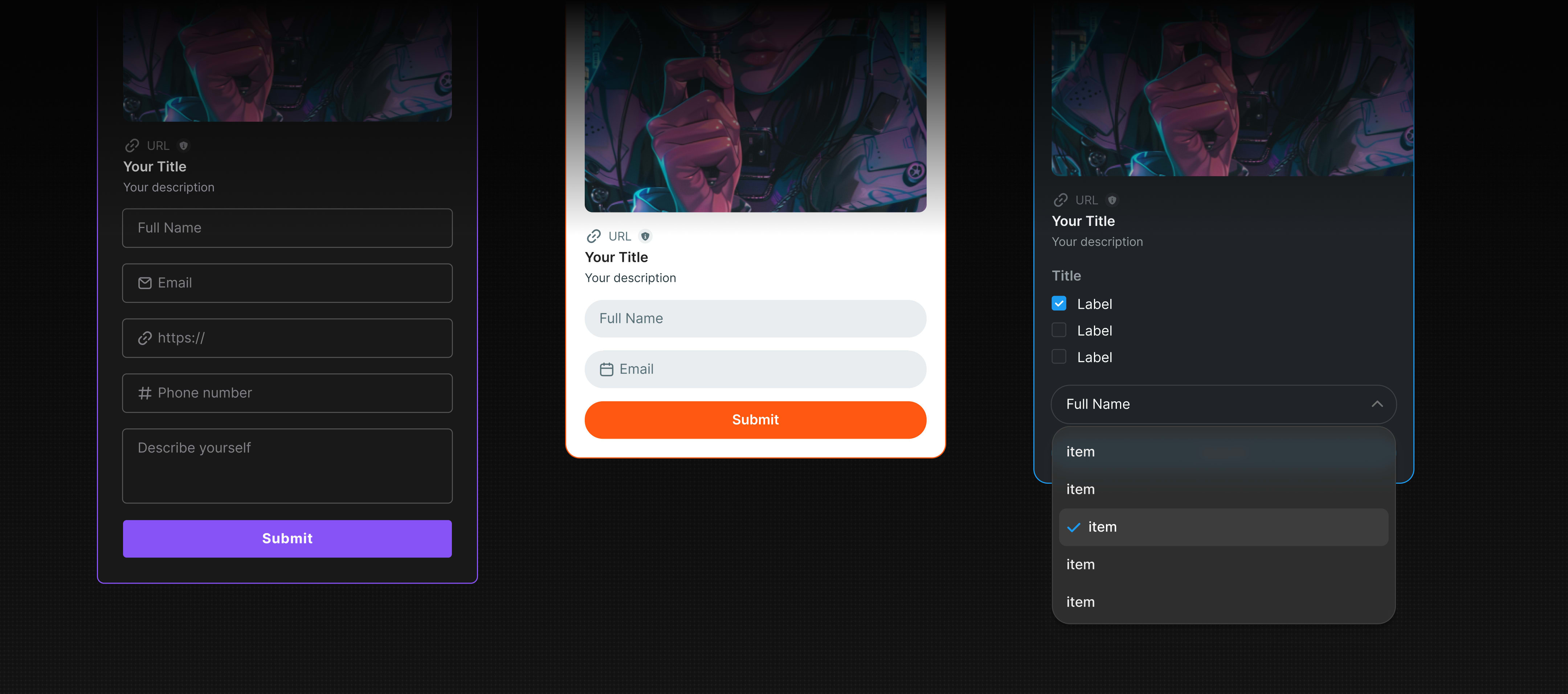 If you want to learn more about the input types that you can use for your blink, check out our forms section.
### Wallets and Apps
As mentioned in the `POST` section, blinks offer a fast and secure way to implement new services into your app, and implementation becomes even easier when using our [UI component kits](/blinks/blinks-client/integrate/ui-components/).
Many wallets have already chosen to use blinks instead of implementing each service for their users themselves.
If you want to learn more about the input types that you can use for your blink, check out our forms section.
### Wallets and Apps
As mentioned in the `POST` section, blinks offer a fast and secure way to implement new services into your app, and implementation becomes even easier when using our [UI component kits](/blinks/blinks-client/integrate/ui-components/).
Many wallets have already chosen to use blinks instead of implementing each service for their users themselves.
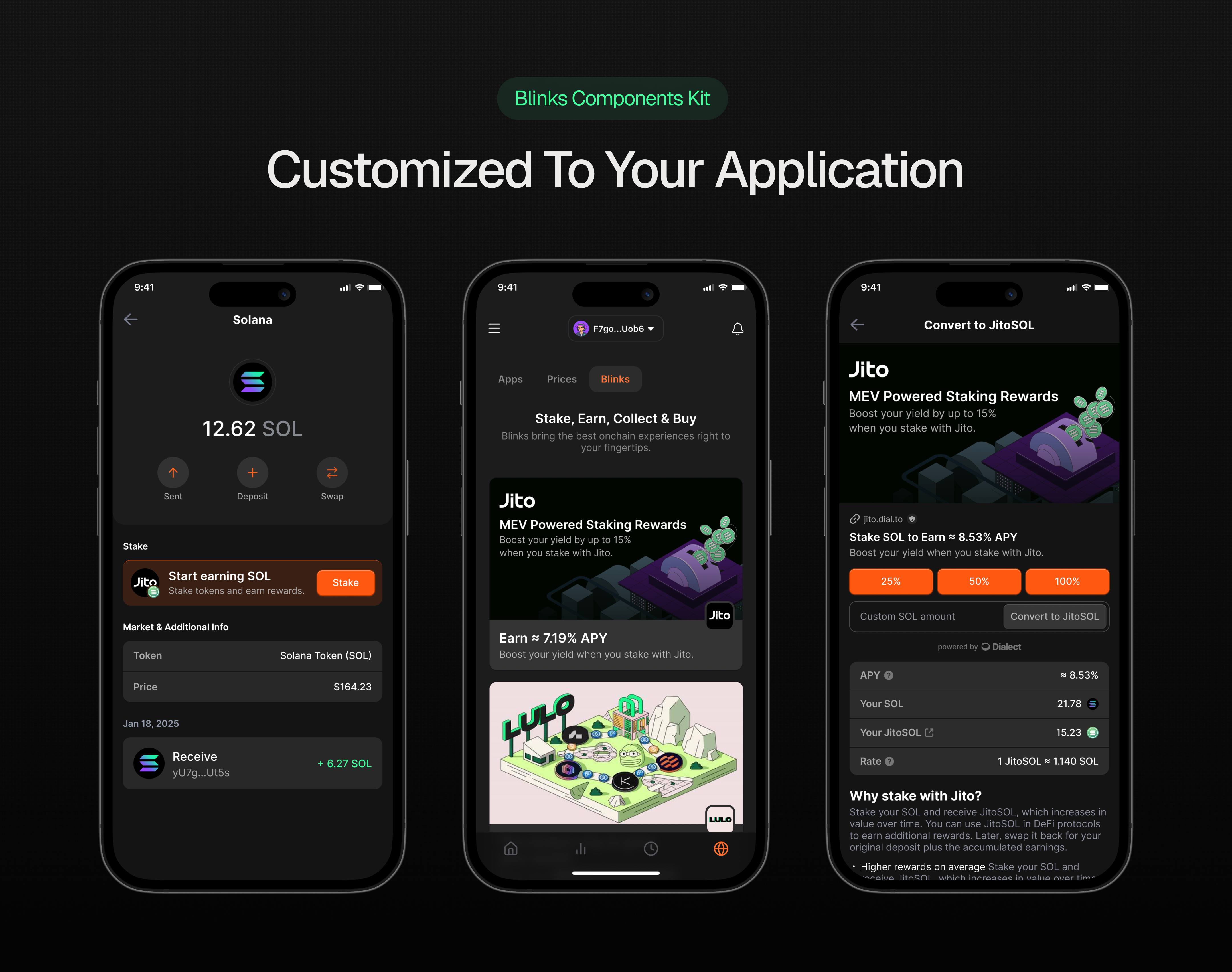 The blink UI component kits are available for React and React Native. Using our [dashboard](https://dashboard.dialect.to/), you can remotely manage your app's blinks: add new ones, change their order, and track their performance—all without deploying a new version of your app.
Our [Standard Blinks Library (SBL)](/standard-blinks-library) is the fastest way to discover all available blinks. From swapping and lending to staking and more, all blinks can be found there. They can be customized and integrated into your app with no-code solutions in just a few clicks.
### Multi-Chain Blinks
The blink technology is chain-agnostic. While it originated on Solana, blinks are now fully EVM-compatible. All you need to do is set the correct CORS headers.
```typescript theme={null}
// CORS headers example for multiple chains
import { ACTIONS_CORS_HEADERS } from "@solana/actions";
// CORS for Solana Devnet
const solanaDevnetHeaders = {
...ACTIONS_CORS_HEADERS,
"x-blockchain-ids": "solana:EtWTRABZaYq6iMfeYKouRu166VU2xqa1", // CAIP2 SOL devnet
"x-action-version": "2.4",
};
// CORS for Monad Testnet
const monadHeaders = {
...ACTIONS_CORS_HEADERS,
"x-blockchain-ids": "eip155:10143", // CAIP2 MON testnet
"x-action-version": "2.4",
};
```
If you want to learn how to build a blink, have a look at our [Guides](/blinks/blinks-provider/guides) or Blinks Provider section.
The blink UI component kits are available for React and React Native. Using our [dashboard](https://dashboard.dialect.to/), you can remotely manage your app's blinks: add new ones, change their order, and track their performance—all without deploying a new version of your app.
Our [Standard Blinks Library (SBL)](/standard-blinks-library) is the fastest way to discover all available blinks. From swapping and lending to staking and more, all blinks can be found there. They can be customized and integrated into your app with no-code solutions in just a few clicks.
### Multi-Chain Blinks
The blink technology is chain-agnostic. While it originated on Solana, blinks are now fully EVM-compatible. All you need to do is set the correct CORS headers.
```typescript theme={null}
// CORS headers example for multiple chains
import { ACTIONS_CORS_HEADERS } from "@solana/actions";
// CORS for Solana Devnet
const solanaDevnetHeaders = {
...ACTIONS_CORS_HEADERS,
"x-blockchain-ids": "solana:EtWTRABZaYq6iMfeYKouRu166VU2xqa1", // CAIP2 SOL devnet
"x-action-version": "2.4",
};
// CORS for Monad Testnet
const monadHeaders = {
...ACTIONS_CORS_HEADERS,
"x-blockchain-ids": "eip155:10143", // CAIP2 MON testnet
"x-action-version": "2.4",
};
```
If you want to learn how to build a blink, have a look at our [Guides](/blinks/blinks-provider/guides) or Blinks Provider section.