> ## Documentation Index
> Fetch the complete documentation index at: https://docs.dialect.to/llms.txt
> Use this file to discover all available pages before exploring further.
# User Management
> Manage user subscriptions, notification preferences, channel configurations, and topic organization for your Dialect integration.
Manage user subscriptions, notification preferences, channel configurations, and topic organization. This section covers the complete user workflow from initial subscription to advanced notification management.
## Prerequisites
Before managing users, ensure you have completed these steps:
1. **App Registration**: Register your app with Dialect (see the [registration guide](/alerts/setup/register-app) if you need to set this up)
## User Management Workflow Overview
Dialect's user management follows a three-step process:
1. **User Subscription**: User subscribes to your app (via notification widget or SDK) and automatically gets IN\_APP notifications
2. **Channel Management**: User can add email and Telegram channels for additional notification delivery methods
3. **Topic Organization**: Configure notification categories and topics that users can selectively subscribe to
## Step 1: Subscription Management
Before a user can receive messages, they have to be subscribed to your service.
### Subscribe user
Create a subscription for a user's wallet address to your app. This automatically enables them to receive IN\_APP notifications.
```typescript theme={null}
// Step 1: User subscribes to your app (gets IN_APP notifications automatically)
const subscription = await dialectSolanaSdk.wallet.dappAddresses.create({
addressId: address.id,
enabled: true,
dappPublicKey,
});
```
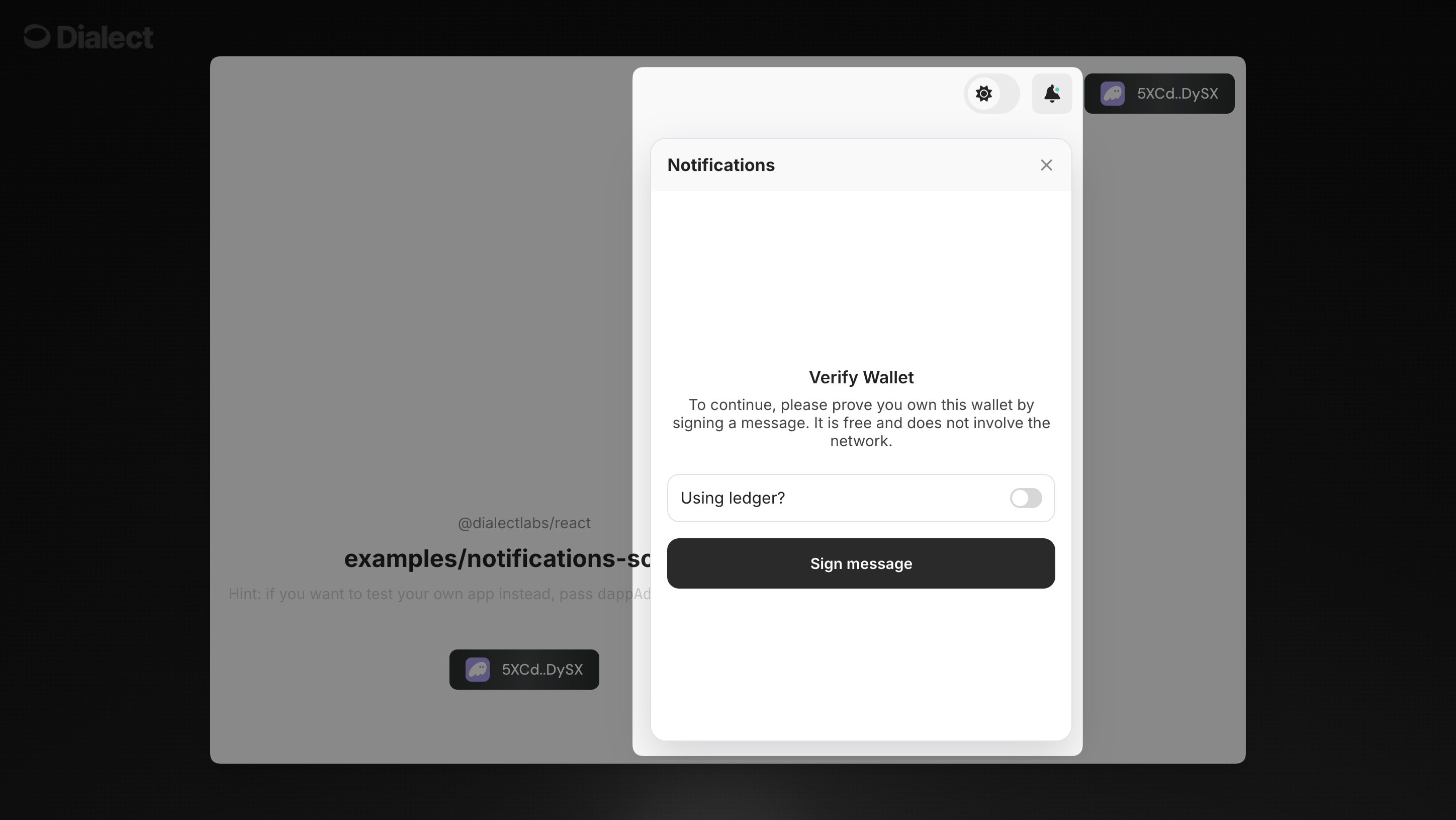 Users subscribe by connecting their wallet and signing a message in the notification widget. This automatically enables IN\_APP notifications.
Subscribe a user to channels via API. You can specify which channels to subscribe to, or omit `channel` to subscribe to all available channels:
```bash theme={null}
curl https://alerts-api.dial.to/v2/subscribe \
--request POST \
--header 'Authorization: Bearer YOUR_AUTH_TOKEN' \
--header 'X-Dialect-Client-Key: YOUR_CLIENT_KEY' \
--header 'Content-Type: application/json' \
--data '{
"appId": "YOUR_APP_ID",
"channel": ["IN_APP", "EMAIL"]
}'
```
* `appId`: Your application's unique identifier (optional if using client key)
* `channel`: Channel or array of channels to subscribe to (`IN_APP`, `EMAIL`, `TELEGRAM`). If omitted, subscribes to all available channels
* `Authorization`: Bearer token (see authentication section)
* `X-Dialect-Client-Key`: Your client key
The response will be an empty JSON object indicating success:
```json theme={null}
{}
```
### Enabling & disabling a subscription
Enable/disable a subscription programmatically:
```typescript theme={null}
const updatedSubscription = await dialectSolanaSdk.wallet.dappAddresses.update({
dappAddressId: subscription.id,
enabled: false,
});
```
Users can enable or disable notifications for your app in the notification widget's settings panel.
*No extra code needed—handled by the component UI.*
Not supported via public API.\
Please use the Notification Components or SDK methods above.
### Getting subscriptions by id
Retrieve a specific subscription using its unique ID:
```typescript theme={null}
const specificSubscription = await dialectSolanaSdk.wallet.dappAddresses.find({
dappAddressId: subscription.id,
});
```
Users can view their current subscription status in the notification widget's settings panel.
*No extra code needed—handled by the component UI.*
Not supported via public API.\
Please use the Notification Components or SDK methods above.
### Getting subscriptions by wallet
Retrieve all subscriptions for a wallet address:
```typescript theme={null}
const allSubscriptions = await dialectSolanaSdk.wallet.dappAddresses.findAll({
dappPublicKey, // optional parameter
addressIds: [address.id], // optional parameter
});
```
Users can view all their subscriptions in the notification widget's settings panel.
*No extra code needed—handled by the component UI.*
Get detailed subscription information for the authenticated user:
```bash theme={null}
curl https://alerts-api.dial.to/v2/apps \
--request GET \
--header 'Authorization: Bearer YOUR_AUTH_TOKEN' \
--header 'X-Dialect-Client-Key: YOUR_CLIENT_KEY'
```
This returns comprehensive subscription details:
```json theme={null}
{
"apps": [
{
"id": "app-uuid",
"name": "Your App Name",
"subscribed": true,
"channels": [
{ "channel": "IN_APP", "subscribed": true },
{ "channel": "EMAIL", "subscribed": false },
{ "channel": "TELEGRAM", "subscribed": true }
],
"topics": [
{
"id": "topic-uuid",
"name": "Price Alerts",
"slug": "price-alerts",
"subscribed": true
}
]
}
]
}
```
### Getting subscribers by app
Not available via SDK. Use the API method below for server-side subscriber management.
App owners can view subscriber counts and details through their admin dashboard, not through the notification widget.
*Subscriber management is handled server-side.*
Get all subscribers for your app (app owner perspective):
```bash theme={null}
curl https://alerts-api.dial.to/v2/{appId}/subscribers \
--request GET \
--header 'x-dialect-api-key: YOUR_API_KEY'
```
* `appId`: Your application's unique identifier
* `offset`: (Optional) Pagination offset (default: 0)
* `limit`: (Optional) Pagination limit (default: 1000, max: 10000)
Response contains all wallet addresses subscribed to your app:
```json theme={null}
{
"subscribers": [
{ "walletAddress": "6CxnSjtasq5Tzwb4b93AhLofXtiDvMpQ2vTkWdSZqTH7" },
{ "walletAddress": "AnotherWalletAddress..." }
]
}
```
### Deleting a subscription
Remove a subscription completely:
```typescript theme={null}
await dialectSolanaSdk.wallet.dappAddresses.delete({
dappAddressId: subscription.id,
});
```
Users can unsubscribe from your app in the notification widget's settings panel.
*No extra code needed—handled by the component UI.*
Unsubscribe from an app or specific channels:
```bash theme={null}
curl https://alerts-api.dial.to/v2/unsubscribe \
--request POST \
--header 'Authorization: Bearer YOUR_AUTH_TOKEN' \
--header 'X-Dialect-Client-Key: YOUR_CLIENT_KEY' \
--header 'Content-Type: application/json' \
--data '{
"appId": "YOUR_APP_ID",
"channel": ["IN_APP", "EMAIL", "TELEGRAM"]
}'
```
* `appId`: App ID or array of App IDs. If omitted, targets all apps available for the client
* `channel`: Channel or array of channels to unsubscribe from. If omitted, unsubscribes from all channels
To completely unsubscribe from an app, omit the `channel` parameter:
```bash theme={null}
curl https://alerts-api.dial.to/v2/unsubscribe \
--request POST \
--header 'Authorization: Bearer YOUR_AUTH_TOKEN' \
--header 'X-Dialect-Client-Key: YOUR_CLIENT_KEY' \
--header 'Content-Type: application/json' \
--data '{
"appId": "YOUR_APP_ID"
}'
```
## Step 2: Channel Management
After subscribing to your app, users can add additional notification channels like email and Telegram. Users manage addresses via the Dialect data service, where they may add, verify, update & remove addresses for these various channels.
### Add User Email Address
Add an email address for a user to receive notifications via email. The address will need to be verified before notifications can be sent.
```typescript theme={null}
// Step 2: User can add additional channels like email or Telegram
const address = await dialectSolanaSdk.wallet.addresses.create({
type: AddressType.Email,
value: "address@mailservice.com",
});
```
Users add and manage channels (email, Telegram) in the notification widget's settings screen. The component handles verification and management flows.
```tsx theme={null}
```
*In the settings panel, users can add, verify, and remove channels. No extra code needed!*
Not supported via public API.\
Please use the Notification Components or SDK methods above.
### Verify an address
Dialect uses verification codes to verify ownership of web2 channels such as email and Telegram. These codes are sent to the address in question.
```typescript theme={null}
// Verify address (email or telegram). Constraint: there are
// 3 attempts to verify address, otherwise use call below to send new
// verification code
const verifiedAddress = await dialectSolanaSdk.wallet.addresses.verify({
addressId: address.id,
code: "1337",
});
```
If you did not receive the verification code, or if you failed to enter the correct value after several attempts, you can send a new code via the following call:
```typescript theme={null}
// Resend verification code. Constraint: you must wait 60 sec before
// resending the code.
await dialectSolanaSdk.wallet.addresses.resendVerificationCode({
addressId: address.id,
});
```
Users verify their email/Telegram addresses in the notification widget's settings screen by entering the verification code sent to their address.
*No extra code needed—handled by the component UI.*
Not supported via public API.\
Please use the Notification Components or SDK methods above.
### Get addresses owned by a wallet
Retrieve address information for a wallet. This shows all the notification channels (email, Telegram) that a user has configured.
```typescript theme={null}
// Find all addresses owned by wallet
const allAddresses = await dialectSolanaSdk.wallet.addresses.findAll();
// Find specific address owned by wallet
const specificAddress = await dialectSolanaSdk.wallet.addresses.find({
addressId: address.id,
});
```
You can also check email subscription status using the hook:
```typescript theme={null}
import { AddressType } from '@dialectlabs/sdk';
import { useNotificationChannelDappSubscription } from '@dialectlabs/react-sdk';
// Check email subscription status
const {
enabled: emailEnabled,
isFetchingSubscriptions: emailFetching,
} = useNotificationChannelDappSubscription({
addressType: AddressType.Email,
dappAddress: DAPP_ADDRESS,
});
if (!emailFetching) {
console.log('Email subscribed:', emailEnabled);
}
```
Users can view all their configured notification channels in the notification widget's settings screen.
*No extra code needed—handled by the component UI.*
Get channel subscription status via the apps endpoint:
```bash theme={null}
curl https://alerts-api.dial.to/v2/apps \
--request GET \
--header 'Authorization: Bearer YOUR_AUTH_TOKEN' \
--header 'X-Dialect-Client-Key: YOUR_CLIENT_KEY'
```
This shows which channels are subscribed for each app:
```json theme={null}
{
"apps": [
{
"id": "app-uuid",
"name": "Your App",
"subscribed": true,
"channels": [
{ "channel": "IN_APP", "subscribed": true },
{ "channel": "EMAIL", "subscribed": false },
{ "channel": "TELEGRAM", "subscribed": true }
]
}
]
}
```
Note: This endpoint shows channel subscription status, but email/Telegram addresses must be managed via components or SDK.
### Subscribe to specific channels
Use the `useNotificationChannelDappSubscription` hook to manage email subscriptions:
```typescript theme={null}
import { AddressType } from '@dialectlabs/sdk';
import { useNotificationChannelDappSubscription } from '@dialectlabs/react-sdk';
// Subscribe to email notifications for your dapp
const {
enabled: emailEnabled,
isToggling: emailToggling,
toggleSubscription: toggleEmailSubscription,
} = useNotificationChannelDappSubscription({
addressType: AddressType.Email,
dappAddress: DAPP_ADDRESS,
});
// Enable email notifications
await toggleEmailSubscription({ enabled: true });
```
Users can enable/disable specific channels (email, Telegram) in the notification widget's settings screen.
*No extra code needed—handled by the component UI.*
Subscribe to specific channels for an app:
```bash theme={null}
curl https://alerts-api.dial.to/v2/subscribe \
--request POST \
--header 'Authorization: Bearer YOUR_AUTH_TOKEN' \
--header 'X-Dialect-Client-Key: YOUR_CLIENT_KEY' \
--header 'Content-Type: application/json' \
--data '{
"appId": "YOUR_APP_ID",
"channel": ["EMAIL", "TELEGRAM"]
}'
```
Note: Email and Telegram channels require the user to have already added and verified those addresses via components or SDK.
### Unsubscribe from specific channels
Use the same `useNotificationChannelDappSubscription` hook to disable email notifications:
```typescript theme={null}
import { AddressType } from '@dialectlabs/sdk';
import { useNotificationChannelDappSubscription } from '@dialectlabs/react-sdk';
const {
enabled: emailEnabled,
isToggling: emailToggling,
toggleSubscription: toggleEmailSubscription,
} = useNotificationChannelDappSubscription({
addressType: AddressType.Email,
dappAddress: DAPP_ADDRESS,
});
// Disable email notifications
await toggleEmailSubscription({ enabled: false });
// Check current subscription status
console.log('Email notifications enabled:', emailEnabled);
console.log('Currently toggling:', emailToggling);
```
Users can disable specific channels in the notification widget's settings screen while keeping other channels active.
*No extra code needed—handled by the component UI.*
Unsubscribe from specific channels while maintaining subscription to others:
```bash theme={null}
curl https://alerts-api.dial.to/v2/unsubscribe \
--request POST \
--header 'Authorization: Bearer YOUR_AUTH_TOKEN' \
--header 'X-Dialect-Client-Key: YOUR_CLIENT_KEY' \
--header 'Content-Type: application/json' \
--data '{
"appId": "YOUR_APP_ID",
"channel": ["EMAIL"]
}'
```
This will unsubscribe from EMAIL notifications while keeping IN\_APP and TELEGRAM active.
### Update an address
You can update an address at any time. All of your subscriptions will remain intact, but won't be sent until you re-verify.
```typescript theme={null}
// Update address value
const updatedAddress = await dialectSolanaSdk.wallet.addresses.update({
addressId: address.id,
value: "updated.address@example.com",
});
```
Users can update their email/Telegram addresses in the notification widget's settings screen.
*No extra code needed—handled by the component UI.*
Not supported via public API.\
Please use the Notification Components or SDK methods above.
### Remove an address
You can delete an address at any time. This will remove all subscriptions associated with that address.
```typescript theme={null}
// Delete address
await dialectSolanaSdk.wallet.addresses.delete({
addressId: address.id,
});
```
Users can remove email/Telegram addresses in the notification widget's settings screen.
*No extra code needed—handled by the component UI.*
Not supported via public API.\
Please use the Notification Components or SDK methods above.
### Push Notifications
Push Notifications require a more complex setup and you can find a full walkthrough in the [API section](/alerts/integrate-inbox/api/push-notifications).
## Step 3: Topic Management
Create and manage notification topics to organize and categorize your app's notifications. Topics help users subscribe to specific types of alerts they care about.
### Create a new notification type
Define a new category of notifications for your app. Each notification type represents a specific kind of alert that users can subscribe to independently.
```typescript theme={null}
// Create a new notification type
const dapp = await dialectSolanaSdk.dapps.find();
if (!dapp) {
throw new IllegalStateError(
"Dapp doesn't exist, please create dapp before using it"
);
}
const notificationType = await dapp.notificationTypes.create({
humanReadableId: "announcements",
name: "Announcements",
orderingPriority: 0,
trigger: "Notification description or triggering event/conditions",
defaultConfig: {
enabled: true,
},
});
```
App owners create notification topics through their backend or admin interface, not through the notification widget.
*Topics are created server-side and automatically appear in user widgets.*
Not supported via public API.\
Please use the SDK method above.
### Update an existing notification type
Modify the properties of an existing notification type, such as changing its name or trigger description. This is useful when refining your notification categories.
```typescript theme={null}
const allNotificationTypes = await dapp.notificationTypes.findAll();
if (allNotificationTypes.length < 1) return;
const notificationType = allNotificationTypes[0];
const patched = await dapp.notificationTypes.patch(notificationType.id, {
name: "New feature announcements",
});
```
App owners update notification topics through their backend or admin interface, not through the notification widget.
*Topic updates are managed server-side and automatically reflected in user widgets.*
Not supported via public API.\
Please use the SDK method above.
### Get all topics
Retrieve all notification types (topics) for your app:
```typescript theme={null}
const dapp = await dialectSolanaSdk.dapps.find();
const allNotificationTypes = await dapp.notificationTypes.findAll();
// Or find a specific topic by human-readable ID
const specificTopic = await dapp.notificationTypes.find({
humanReadableId: "price-alerts"
});
```
Users can view all available topics for each app in the notification widget's settings screen.
*No extra code needed—handled by the component UI.*
Get all available topics for a user:
```bash theme={null}
curl https://alerts-api.dial.to/v2/topics?appId=YOUR_APP_ID \
--request GET \
--header 'Authorization: Bearer YOUR_AUTH_TOKEN' \
--header 'X-Dialect-Client-Key: YOUR_CLIENT_KEY'
```
This returns topics organized by app with subscription status:
```json theme={null}
{
"byApp": {
"app-uuid": {
"items": [
{
"id": "topic-uuid",
"name": "Price Alerts",
"description": "Receive alerts when prices drop",
"slug": "price-alerts",
"subscribed": true
}
]
}
}
}
```
### Subscribe to topics
Use the `useNotificationSubscriptions` hook to manage topic subscriptions:
```typescript theme={null}
import { useNotificationSubscriptions } from '@dialectlabs/react-sdk';
const {
subscriptions,
update,
isFetching,
isUpdating,
} = useNotificationSubscriptions({
dappAddress: DAPP_ADDRESS,
});
// Subscribe to a specific topic
const subscribeToTopic = async (topicId: string) => {
await update({
notificationTypeId: topicId,
config: {
enabled: true,
},
});
};
// Example: Subscribe to price alerts topic
await subscribeToTopic('price-alerts-topic-id');
```
Users can subscribe to topics directly in the notification widget's settings screen.\
When a user toggles a topic on, the component handles the subscription automatically.
```tsx theme={null}
```
*In the settings panel, users can toggle topics on/off. No extra code needed!*
Subscribe to a specific topic:
```bash theme={null}
curl https://alerts-api.dial.to/v2/topics/subscribe \
--request POST \
--header 'Authorization: Bearer YOUR_AUTH_TOKEN' \
--header 'X-Dialect-Client-Key: YOUR_CLIENT_KEY' \
--header 'Content-Type: application/json' \
--data '{
"topicId": "123e4567-e89b-12d3-a456-426614174000"
}'
```
### Unsubscribe from topics
Use the same `useNotificationSubscriptions` hook to unsubscribe from topics:
```typescript theme={null}
import { useNotificationSubscriptions } from '@dialectlabs/react-sdk';
const {
subscriptions,
update,
isUpdating,
} = useNotificationSubscriptions({
dappAddress: DAPP_ADDRESS,
});
// Unsubscribe from a specific topic
const unsubscribeFromTopic = async (topicId: string) => {
await update({
notificationTypeId: topicId,
config: {
enabled: false,
},
});
};
// Example: Unsubscribe from price alerts topic
await unsubscribeFromTopic('price-alerts-topic-id');
```
Users can unsubscribe from topics directly in the notification widget's settings screen by toggling them off.
*No extra code needed—handled by the component UI.*
Unsubscribe from a specific topic:
```bash theme={null}
curl https://alerts-api.dial.to/v2/topics/unsubscribe \
--request POST \
--header 'Authorization: Bearer YOUR_AUTH_TOKEN' \
--header 'X-Dialect-Client-Key: YOUR_CLIENT_KEY' \
--header 'Content-Type: application/json' \
--data '{
"topicId": "123e4567-e89b-12d3-a456-426614174000"
}'
```
### Get topic subscription status
Use the `useNotificationSubscriptions` hook to get topic subscription status:
```typescript theme={null}
import { useNotificationSubscriptions } from '@dialectlabs/react-sdk';
const {
subscriptions,
isFetching,
} = useNotificationSubscriptions({
dappAddress: DAPP_ADDRESS,
});
// Check if a specific topic is subscribed
const isTopicSubscribed = (topicId: string) => {
const subscription = subscriptions.find(
(sub) => sub.notificationType.id === topicId
);
return subscription?.subscription?.config?.enabled || false;
};
// Get all subscribed topics
const subscribedTopics = subscriptions.filter(
(sub) => sub.subscription?.config?.enabled
);
if (!isFetching) {
console.log('Price alerts subscribed:', isTopicSubscribed('price-alerts-topic-id'));
console.log('All subscribed topics:', subscribedTopics);
}
```
Users can view their topic subscription status in the notification widget's settings screen.
*No extra code needed—handled by the component UI.*
Get topic subscription status via the apps endpoint:
```bash theme={null}
curl https://alerts-api.dial.to/v2/apps \
--request GET \
--header 'Authorization: Bearer YOUR_AUTH_TOKEN' \
--header 'X-Dialect-Client-Key: YOUR_CLIENT_KEY'
```
This returns apps with their topics and subscription status:
```json theme={null}
{
"apps": [
{
"id": "app-uuid",
"name": "Your App",
"subscribed": true,
"topics": [
{
"id": "topic-uuid",
"name": "Price Alerts",
"slug": "price-alerts",
"subscribed": true
}
]
}
]
}
```
## Best Practices
💡 **User Experience Tips**:
* Start users with a simple subscription, then let them add channels as needed
* Create meaningful notification types that users actually want to subscribe to
* Good topics are specific enough to be useful but broad enough to generate regular content
* Always respect user preferences and make unsubscribing easy
💡 **Technical Tips**:
* Always subscribe users to your app first using `dappAddresses.create()` before adding additional notification channels
* Implement proper error handling for address verification flows
* Use batch operations when managing multiple users to avoid rate limits
## Next Steps
Now that you understand user management concepts, you're ready to implement notification components:
1. **[NotificationsButton](/alerts/integrate-inbox/sdk/notifications-button)** - Complete done-for-you solution
2. **[Notifications](/alerts/integrate-inbox/sdk/notifications)** - Standalone component for custom integration
The components handle all the user management workflows described above, providing your users with intuitive interfaces for managing their notification preferences.
Users subscribe by connecting their wallet and signing a message in the notification widget. This automatically enables IN\_APP notifications.
Subscribe a user to channels via API. You can specify which channels to subscribe to, or omit `channel` to subscribe to all available channels:
```bash theme={null}
curl https://alerts-api.dial.to/v2/subscribe \
--request POST \
--header 'Authorization: Bearer YOUR_AUTH_TOKEN' \
--header 'X-Dialect-Client-Key: YOUR_CLIENT_KEY' \
--header 'Content-Type: application/json' \
--data '{
"appId": "YOUR_APP_ID",
"channel": ["IN_APP", "EMAIL"]
}'
```
* `appId`: Your application's unique identifier (optional if using client key)
* `channel`: Channel or array of channels to subscribe to (`IN_APP`, `EMAIL`, `TELEGRAM`). If omitted, subscribes to all available channels
* `Authorization`: Bearer token (see authentication section)
* `X-Dialect-Client-Key`: Your client key
The response will be an empty JSON object indicating success:
```json theme={null}
{}
```
### Enabling & disabling a subscription
Enable/disable a subscription programmatically:
```typescript theme={null}
const updatedSubscription = await dialectSolanaSdk.wallet.dappAddresses.update({
dappAddressId: subscription.id,
enabled: false,
});
```
Users can enable or disable notifications for your app in the notification widget's settings panel.
*No extra code needed—handled by the component UI.*
Not supported via public API.\
Please use the Notification Components or SDK methods above.
### Getting subscriptions by id
Retrieve a specific subscription using its unique ID:
```typescript theme={null}
const specificSubscription = await dialectSolanaSdk.wallet.dappAddresses.find({
dappAddressId: subscription.id,
});
```
Users can view their current subscription status in the notification widget's settings panel.
*No extra code needed—handled by the component UI.*
Not supported via public API.\
Please use the Notification Components or SDK methods above.
### Getting subscriptions by wallet
Retrieve all subscriptions for a wallet address:
```typescript theme={null}
const allSubscriptions = await dialectSolanaSdk.wallet.dappAddresses.findAll({
dappPublicKey, // optional parameter
addressIds: [address.id], // optional parameter
});
```
Users can view all their subscriptions in the notification widget's settings panel.
*No extra code needed—handled by the component UI.*
Get detailed subscription information for the authenticated user:
```bash theme={null}
curl https://alerts-api.dial.to/v2/apps \
--request GET \
--header 'Authorization: Bearer YOUR_AUTH_TOKEN' \
--header 'X-Dialect-Client-Key: YOUR_CLIENT_KEY'
```
This returns comprehensive subscription details:
```json theme={null}
{
"apps": [
{
"id": "app-uuid",
"name": "Your App Name",
"subscribed": true,
"channels": [
{ "channel": "IN_APP", "subscribed": true },
{ "channel": "EMAIL", "subscribed": false },
{ "channel": "TELEGRAM", "subscribed": true }
],
"topics": [
{
"id": "topic-uuid",
"name": "Price Alerts",
"slug": "price-alerts",
"subscribed": true
}
]
}
]
}
```
### Getting subscribers by app
Not available via SDK. Use the API method below for server-side subscriber management.
App owners can view subscriber counts and details through their admin dashboard, not through the notification widget.
*Subscriber management is handled server-side.*
Get all subscribers for your app (app owner perspective):
```bash theme={null}
curl https://alerts-api.dial.to/v2/{appId}/subscribers \
--request GET \
--header 'x-dialect-api-key: YOUR_API_KEY'
```
* `appId`: Your application's unique identifier
* `offset`: (Optional) Pagination offset (default: 0)
* `limit`: (Optional) Pagination limit (default: 1000, max: 10000)
Response contains all wallet addresses subscribed to your app:
```json theme={null}
{
"subscribers": [
{ "walletAddress": "6CxnSjtasq5Tzwb4b93AhLofXtiDvMpQ2vTkWdSZqTH7" },
{ "walletAddress": "AnotherWalletAddress..." }
]
}
```
### Deleting a subscription
Remove a subscription completely:
```typescript theme={null}
await dialectSolanaSdk.wallet.dappAddresses.delete({
dappAddressId: subscription.id,
});
```
Users can unsubscribe from your app in the notification widget's settings panel.
*No extra code needed—handled by the component UI.*
Unsubscribe from an app or specific channels:
```bash theme={null}
curl https://alerts-api.dial.to/v2/unsubscribe \
--request POST \
--header 'Authorization: Bearer YOUR_AUTH_TOKEN' \
--header 'X-Dialect-Client-Key: YOUR_CLIENT_KEY' \
--header 'Content-Type: application/json' \
--data '{
"appId": "YOUR_APP_ID",
"channel": ["IN_APP", "EMAIL", "TELEGRAM"]
}'
```
* `appId`: App ID or array of App IDs. If omitted, targets all apps available for the client
* `channel`: Channel or array of channels to unsubscribe from. If omitted, unsubscribes from all channels
To completely unsubscribe from an app, omit the `channel` parameter:
```bash theme={null}
curl https://alerts-api.dial.to/v2/unsubscribe \
--request POST \
--header 'Authorization: Bearer YOUR_AUTH_TOKEN' \
--header 'X-Dialect-Client-Key: YOUR_CLIENT_KEY' \
--header 'Content-Type: application/json' \
--data '{
"appId": "YOUR_APP_ID"
}'
```
## Step 2: Channel Management
After subscribing to your app, users can add additional notification channels like email and Telegram. Users manage addresses via the Dialect data service, where they may add, verify, update & remove addresses for these various channels.
### Add User Email Address
Add an email address for a user to receive notifications via email. The address will need to be verified before notifications can be sent.
```typescript theme={null}
// Step 2: User can add additional channels like email or Telegram
const address = await dialectSolanaSdk.wallet.addresses.create({
type: AddressType.Email,
value: "address@mailservice.com",
});
```
Users add and manage channels (email, Telegram) in the notification widget's settings screen. The component handles verification and management flows.
```tsx theme={null}
```
*In the settings panel, users can add, verify, and remove channels. No extra code needed!*
Not supported via public API.\
Please use the Notification Components or SDK methods above.
### Verify an address
Dialect uses verification codes to verify ownership of web2 channels such as email and Telegram. These codes are sent to the address in question.
```typescript theme={null}
// Verify address (email or telegram). Constraint: there are
// 3 attempts to verify address, otherwise use call below to send new
// verification code
const verifiedAddress = await dialectSolanaSdk.wallet.addresses.verify({
addressId: address.id,
code: "1337",
});
```
If you did not receive the verification code, or if you failed to enter the correct value after several attempts, you can send a new code via the following call:
```typescript theme={null}
// Resend verification code. Constraint: you must wait 60 sec before
// resending the code.
await dialectSolanaSdk.wallet.addresses.resendVerificationCode({
addressId: address.id,
});
```
Users verify their email/Telegram addresses in the notification widget's settings screen by entering the verification code sent to their address.
*No extra code needed—handled by the component UI.*
Not supported via public API.\
Please use the Notification Components or SDK methods above.
### Get addresses owned by a wallet
Retrieve address information for a wallet. This shows all the notification channels (email, Telegram) that a user has configured.
```typescript theme={null}
// Find all addresses owned by wallet
const allAddresses = await dialectSolanaSdk.wallet.addresses.findAll();
// Find specific address owned by wallet
const specificAddress = await dialectSolanaSdk.wallet.addresses.find({
addressId: address.id,
});
```
You can also check email subscription status using the hook:
```typescript theme={null}
import { AddressType } from '@dialectlabs/sdk';
import { useNotificationChannelDappSubscription } from '@dialectlabs/react-sdk';
// Check email subscription status
const {
enabled: emailEnabled,
isFetchingSubscriptions: emailFetching,
} = useNotificationChannelDappSubscription({
addressType: AddressType.Email,
dappAddress: DAPP_ADDRESS,
});
if (!emailFetching) {
console.log('Email subscribed:', emailEnabled);
}
```
Users can view all their configured notification channels in the notification widget's settings screen.
*No extra code needed—handled by the component UI.*
Get channel subscription status via the apps endpoint:
```bash theme={null}
curl https://alerts-api.dial.to/v2/apps \
--request GET \
--header 'Authorization: Bearer YOUR_AUTH_TOKEN' \
--header 'X-Dialect-Client-Key: YOUR_CLIENT_KEY'
```
This shows which channels are subscribed for each app:
```json theme={null}
{
"apps": [
{
"id": "app-uuid",
"name": "Your App",
"subscribed": true,
"channels": [
{ "channel": "IN_APP", "subscribed": true },
{ "channel": "EMAIL", "subscribed": false },
{ "channel": "TELEGRAM", "subscribed": true }
]
}
]
}
```
Note: This endpoint shows channel subscription status, but email/Telegram addresses must be managed via components or SDK.
### Subscribe to specific channels
Use the `useNotificationChannelDappSubscription` hook to manage email subscriptions:
```typescript theme={null}
import { AddressType } from '@dialectlabs/sdk';
import { useNotificationChannelDappSubscription } from '@dialectlabs/react-sdk';
// Subscribe to email notifications for your dapp
const {
enabled: emailEnabled,
isToggling: emailToggling,
toggleSubscription: toggleEmailSubscription,
} = useNotificationChannelDappSubscription({
addressType: AddressType.Email,
dappAddress: DAPP_ADDRESS,
});
// Enable email notifications
await toggleEmailSubscription({ enabled: true });
```
Users can enable/disable specific channels (email, Telegram) in the notification widget's settings screen.
*No extra code needed—handled by the component UI.*
Subscribe to specific channels for an app:
```bash theme={null}
curl https://alerts-api.dial.to/v2/subscribe \
--request POST \
--header 'Authorization: Bearer YOUR_AUTH_TOKEN' \
--header 'X-Dialect-Client-Key: YOUR_CLIENT_KEY' \
--header 'Content-Type: application/json' \
--data '{
"appId": "YOUR_APP_ID",
"channel": ["EMAIL", "TELEGRAM"]
}'
```
Note: Email and Telegram channels require the user to have already added and verified those addresses via components or SDK.
### Unsubscribe from specific channels
Use the same `useNotificationChannelDappSubscription` hook to disable email notifications:
```typescript theme={null}
import { AddressType } from '@dialectlabs/sdk';
import { useNotificationChannelDappSubscription } from '@dialectlabs/react-sdk';
const {
enabled: emailEnabled,
isToggling: emailToggling,
toggleSubscription: toggleEmailSubscription,
} = useNotificationChannelDappSubscription({
addressType: AddressType.Email,
dappAddress: DAPP_ADDRESS,
});
// Disable email notifications
await toggleEmailSubscription({ enabled: false });
// Check current subscription status
console.log('Email notifications enabled:', emailEnabled);
console.log('Currently toggling:', emailToggling);
```
Users can disable specific channels in the notification widget's settings screen while keeping other channels active.
*No extra code needed—handled by the component UI.*
Unsubscribe from specific channels while maintaining subscription to others:
```bash theme={null}
curl https://alerts-api.dial.to/v2/unsubscribe \
--request POST \
--header 'Authorization: Bearer YOUR_AUTH_TOKEN' \
--header 'X-Dialect-Client-Key: YOUR_CLIENT_KEY' \
--header 'Content-Type: application/json' \
--data '{
"appId": "YOUR_APP_ID",
"channel": ["EMAIL"]
}'
```
This will unsubscribe from EMAIL notifications while keeping IN\_APP and TELEGRAM active.
### Update an address
You can update an address at any time. All of your subscriptions will remain intact, but won't be sent until you re-verify.
```typescript theme={null}
// Update address value
const updatedAddress = await dialectSolanaSdk.wallet.addresses.update({
addressId: address.id,
value: "updated.address@example.com",
});
```
Users can update their email/Telegram addresses in the notification widget's settings screen.
*No extra code needed—handled by the component UI.*
Not supported via public API.\
Please use the Notification Components or SDK methods above.
### Remove an address
You can delete an address at any time. This will remove all subscriptions associated with that address.
```typescript theme={null}
// Delete address
await dialectSolanaSdk.wallet.addresses.delete({
addressId: address.id,
});
```
Users can remove email/Telegram addresses in the notification widget's settings screen.
*No extra code needed—handled by the component UI.*
Not supported via public API.\
Please use the Notification Components or SDK methods above.
### Push Notifications
Push Notifications require a more complex setup and you can find a full walkthrough in the [API section](/alerts/integrate-inbox/api/push-notifications).
## Step 3: Topic Management
Create and manage notification topics to organize and categorize your app's notifications. Topics help users subscribe to specific types of alerts they care about.
### Create a new notification type
Define a new category of notifications for your app. Each notification type represents a specific kind of alert that users can subscribe to independently.
```typescript theme={null}
// Create a new notification type
const dapp = await dialectSolanaSdk.dapps.find();
if (!dapp) {
throw new IllegalStateError(
"Dapp doesn't exist, please create dapp before using it"
);
}
const notificationType = await dapp.notificationTypes.create({
humanReadableId: "announcements",
name: "Announcements",
orderingPriority: 0,
trigger: "Notification description or triggering event/conditions",
defaultConfig: {
enabled: true,
},
});
```
App owners create notification topics through their backend or admin interface, not through the notification widget.
*Topics are created server-side and automatically appear in user widgets.*
Not supported via public API.\
Please use the SDK method above.
### Update an existing notification type
Modify the properties of an existing notification type, such as changing its name or trigger description. This is useful when refining your notification categories.
```typescript theme={null}
const allNotificationTypes = await dapp.notificationTypes.findAll();
if (allNotificationTypes.length < 1) return;
const notificationType = allNotificationTypes[0];
const patched = await dapp.notificationTypes.patch(notificationType.id, {
name: "New feature announcements",
});
```
App owners update notification topics through their backend or admin interface, not through the notification widget.
*Topic updates are managed server-side and automatically reflected in user widgets.*
Not supported via public API.\
Please use the SDK method above.
### Get all topics
Retrieve all notification types (topics) for your app:
```typescript theme={null}
const dapp = await dialectSolanaSdk.dapps.find();
const allNotificationTypes = await dapp.notificationTypes.findAll();
// Or find a specific topic by human-readable ID
const specificTopic = await dapp.notificationTypes.find({
humanReadableId: "price-alerts"
});
```
Users can view all available topics for each app in the notification widget's settings screen.
*No extra code needed—handled by the component UI.*
Get all available topics for a user:
```bash theme={null}
curl https://alerts-api.dial.to/v2/topics?appId=YOUR_APP_ID \
--request GET \
--header 'Authorization: Bearer YOUR_AUTH_TOKEN' \
--header 'X-Dialect-Client-Key: YOUR_CLIENT_KEY'
```
This returns topics organized by app with subscription status:
```json theme={null}
{
"byApp": {
"app-uuid": {
"items": [
{
"id": "topic-uuid",
"name": "Price Alerts",
"description": "Receive alerts when prices drop",
"slug": "price-alerts",
"subscribed": true
}
]
}
}
}
```
### Subscribe to topics
Use the `useNotificationSubscriptions` hook to manage topic subscriptions:
```typescript theme={null}
import { useNotificationSubscriptions } from '@dialectlabs/react-sdk';
const {
subscriptions,
update,
isFetching,
isUpdating,
} = useNotificationSubscriptions({
dappAddress: DAPP_ADDRESS,
});
// Subscribe to a specific topic
const subscribeToTopic = async (topicId: string) => {
await update({
notificationTypeId: topicId,
config: {
enabled: true,
},
});
};
// Example: Subscribe to price alerts topic
await subscribeToTopic('price-alerts-topic-id');
```
Users can subscribe to topics directly in the notification widget's settings screen.\
When a user toggles a topic on, the component handles the subscription automatically.
```tsx theme={null}
```
*In the settings panel, users can toggle topics on/off. No extra code needed!*
Subscribe to a specific topic:
```bash theme={null}
curl https://alerts-api.dial.to/v2/topics/subscribe \
--request POST \
--header 'Authorization: Bearer YOUR_AUTH_TOKEN' \
--header 'X-Dialect-Client-Key: YOUR_CLIENT_KEY' \
--header 'Content-Type: application/json' \
--data '{
"topicId": "123e4567-e89b-12d3-a456-426614174000"
}'
```
### Unsubscribe from topics
Use the same `useNotificationSubscriptions` hook to unsubscribe from topics:
```typescript theme={null}
import { useNotificationSubscriptions } from '@dialectlabs/react-sdk';
const {
subscriptions,
update,
isUpdating,
} = useNotificationSubscriptions({
dappAddress: DAPP_ADDRESS,
});
// Unsubscribe from a specific topic
const unsubscribeFromTopic = async (topicId: string) => {
await update({
notificationTypeId: topicId,
config: {
enabled: false,
},
});
};
// Example: Unsubscribe from price alerts topic
await unsubscribeFromTopic('price-alerts-topic-id');
```
Users can unsubscribe from topics directly in the notification widget's settings screen by toggling them off.
*No extra code needed—handled by the component UI.*
Unsubscribe from a specific topic:
```bash theme={null}
curl https://alerts-api.dial.to/v2/topics/unsubscribe \
--request POST \
--header 'Authorization: Bearer YOUR_AUTH_TOKEN' \
--header 'X-Dialect-Client-Key: YOUR_CLIENT_KEY' \
--header 'Content-Type: application/json' \
--data '{
"topicId": "123e4567-e89b-12d3-a456-426614174000"
}'
```
### Get topic subscription status
Use the `useNotificationSubscriptions` hook to get topic subscription status:
```typescript theme={null}
import { useNotificationSubscriptions } from '@dialectlabs/react-sdk';
const {
subscriptions,
isFetching,
} = useNotificationSubscriptions({
dappAddress: DAPP_ADDRESS,
});
// Check if a specific topic is subscribed
const isTopicSubscribed = (topicId: string) => {
const subscription = subscriptions.find(
(sub) => sub.notificationType.id === topicId
);
return subscription?.subscription?.config?.enabled || false;
};
// Get all subscribed topics
const subscribedTopics = subscriptions.filter(
(sub) => sub.subscription?.config?.enabled
);
if (!isFetching) {
console.log('Price alerts subscribed:', isTopicSubscribed('price-alerts-topic-id'));
console.log('All subscribed topics:', subscribedTopics);
}
```
Users can view their topic subscription status in the notification widget's settings screen.
*No extra code needed—handled by the component UI.*
Get topic subscription status via the apps endpoint:
```bash theme={null}
curl https://alerts-api.dial.to/v2/apps \
--request GET \
--header 'Authorization: Bearer YOUR_AUTH_TOKEN' \
--header 'X-Dialect-Client-Key: YOUR_CLIENT_KEY'
```
This returns apps with their topics and subscription status:
```json theme={null}
{
"apps": [
{
"id": "app-uuid",
"name": "Your App",
"subscribed": true,
"topics": [
{
"id": "topic-uuid",
"name": "Price Alerts",
"slug": "price-alerts",
"subscribed": true
}
]
}
]
}
```
## Best Practices
💡 **User Experience Tips**:
* Start users with a simple subscription, then let them add channels as needed
* Create meaningful notification types that users actually want to subscribe to
* Good topics are specific enough to be useful but broad enough to generate regular content
* Always respect user preferences and make unsubscribing easy
💡 **Technical Tips**:
* Always subscribe users to your app first using `dappAddresses.create()` before adding additional notification channels
* Implement proper error handling for address verification flows
* Use batch operations when managing multiple users to avoid rate limits
## Next Steps
Now that you understand user management concepts, you're ready to implement notification components:
1. **[NotificationsButton](/alerts/integrate-inbox/sdk/notifications-button)** - Complete done-for-you solution
2. **[Notifications](/alerts/integrate-inbox/sdk/notifications)** - Standalone component for custom integration
The components handle all the user management workflows described above, providing your users with intuitive interfaces for managing their notification preferences.