> ## Documentation Index
> Fetch the complete documentation index at: https://docs.dialect.to/llms.txt
> Use this file to discover all available pages before exploring further.
# Blinks in Alerts
> Send actionable alerts with embedded Blinks and let your users complete onchain transactions directly in your app. No more redirects or app switching.
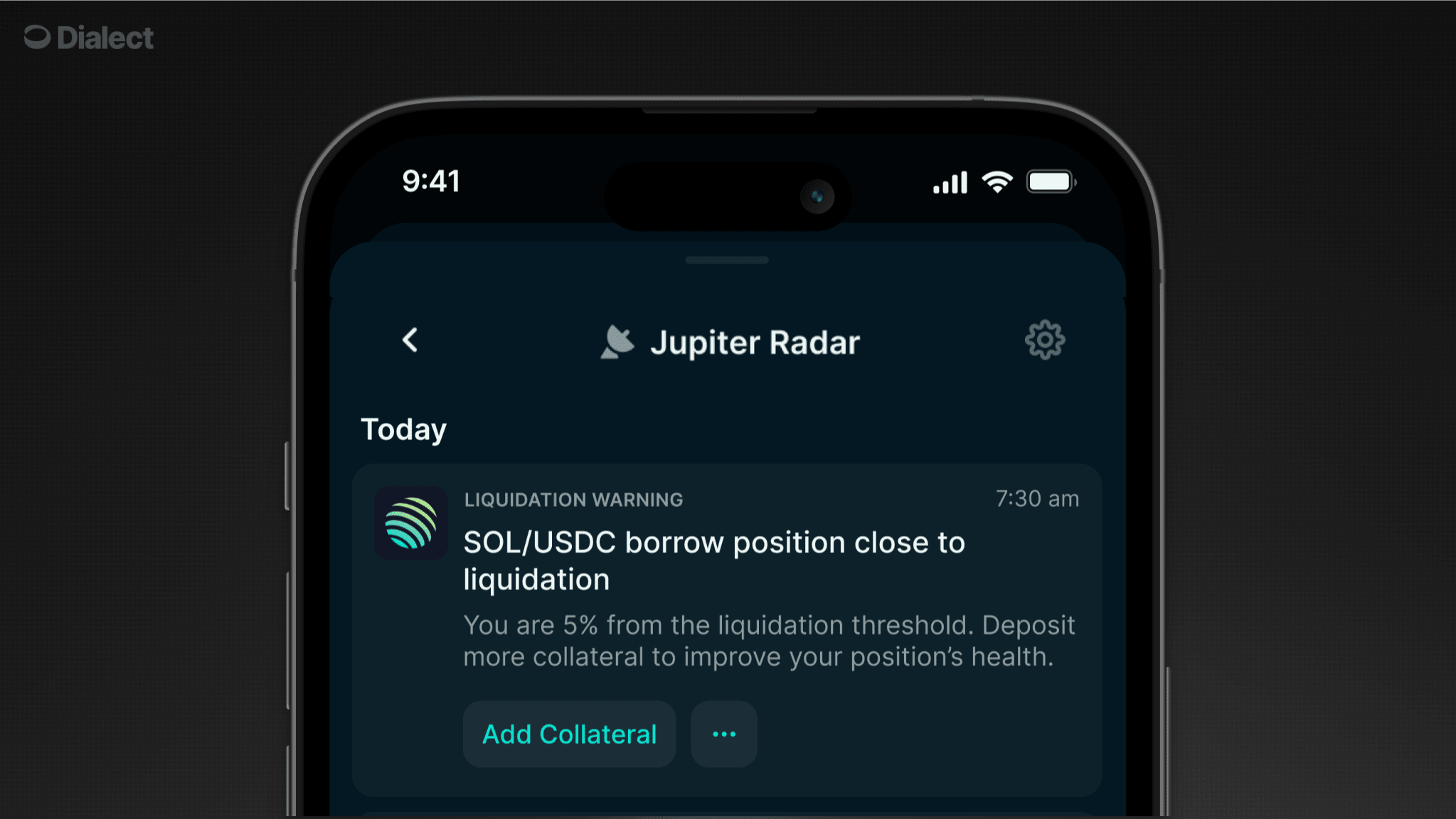 When Dialect's mapping service detects supported protocol URLs in your alerts, it automatically enriches them with contextual data and blink URLs, allowing your users to take immediate action.
Users never leave your application
Rich information to build informed UIs
Blinks handle protocol integrations
Complete transactions in seconds
Currently supports lending protocols (Jupiter Borrow), with more protocols and use cases coming soon.
## Example: Liquidation Warning Flow
For this example, we'll use Jupiter Borrow as the protocol and a scenario where a user's lending position reaches a critical LTV threshold.
### Scenario
* User has a SOL/USDC lending position on Jupiter Borrow
* Position reaches 78% LTV (liquidation threshold is 80%)
* User receives a liquidation warning alert
### Step 1: Send the Alert
Your backend sends an alert with the protocol website URL:
```json {13} theme={null}
{
"recipient": {
"type": "subscriber",
"walletAddress": "6JpNV6DK88auwzKVizdeT4Bw3D44sam5GqjcPCJ7y176"
},
"channels": ["IN_APP", "PUSH"],
"message": {
"title": "Liquidation Warning",
"body": "Your SOL/USDC position is at 78% LTV, approaching liquidation threshold of 80%.",
"actions": [{
"type": "link",
"label": "Add Collateral",
"url": "https://jup.ag/lend/borrow/1/nfts/2433"
}]
}
}
```
### Step 2: Client Receives Enriched Alert
Dialect detects the Jupiter Borrow URL and enriches the response:
```json {10-14} theme={null}
{
"id": "alert-uuid",
"title": "Liquidation Warning",
"body": "Your SOL/USDC position is at 78% LTV, approaching liquidation threshold of 80%.",
"timestamp": "2024-01-15T10:30:00Z",
"actions": [{
"type": "link",
"label": "Add Collateral",
"url": "https://jup.ag/lend/borrow/1/nfts/2433",
"context": {
"type": "position",
"apiUrl": "https://markets.dial.to/api/v0/positions/owners?walletAddresses=6JpNV6DK88auwzKVizdeT4Bw3D44sam5GqjcPCJ7y176&bundleIds=jupiter.borrow.1.2433",
"action": "deposit"
}
}]
}
```
### Step 3: Fetch Position Data
When the user clicks a button in the alert, fetch the position data from the [Markets and Positions API](/api-reference/positions/list-all-market-positions-by-wallet-address):
```bash theme={null}
curl 'https://markets.dial.to/api/v0/positions/owners?walletAddresses=6JpNV6DK88auwzKVizdeT4Bw3D44sam5GqjcPCJ7y176&bundleIds=jupiter.borrow.1.2433' \
--header 'x-dialect-api-key: pk_demo'
```
The response includes detailed position and market data:
```json theme={null}
{
"positions": [
{
"id": "jupiter.borrow.1.2433.deposit",
"type": "lending",
"marketId": "jupiter.borrow.1",
"ownerAddress": "6JpNV6DK88auwzKVizdeT4Bw3D44sam5GqjcPCJ7y176",
"bundleId": "jupiter.borrow.1.2433",
"side": "deposit",
"additionalData": {
"vaultId": 1,
"nftId": 2433
},
"actions": {
"deposit": {
"blinkUrl": "blink:https://jupiter.dial.to/api/v0/lend/borrow/1/deposit?positionId=2433"
},
"withdraw": {
"blinkUrl": "blink:https://jupiter.dial.to/api/v0/lend/borrow/1/2433/withdraw"
}
},
"amount": 0.015060007,
"amountUsd": 3.34,
"ltv": 0.3033,
"liquidationPrice": 84.00917409932147,
"market": { ... }
},
// ... borrow position
]
}
```
```json theme={null}
{
"positions": [
{
"id": "jupiter.borrow.1.2433.deposit",
"type": "lending",
"marketId": "jupiter.borrow.1",
"ownerAddress": "6JpNV6DK88auwzKVizdeT4Bw3D44sam5GqjcPCJ7y176",
"bundleId": "jupiter.borrow.1.2433",
"side": "deposit",
"additionalData": {
"vaultId": 1,
"nftId": 2433
},
"actions": {
"deposit": {
"blinkUrl": "blink:https://jupiter.dial.to/api/v0/lend/borrow/1/deposit?positionId=2433"
},
"withdraw": {
"blinkUrl": "blink:https://jupiter.dial.to/api/v0/lend/borrow/1/2433/withdraw"
}
},
"amount": 0.015060007,
"amountUsd": 3.34,
"ltv": 0.3033,
"liquidationPrice": 84.00917409932147,
"market": {
"id": "jupiter.borrow.1",
"type": "lending",
"provider": {
"id": "jupiter",
"name": "Jupiter",
"icon": "https://imagedelivery.net/C7jfNnfrjpAYWW6YevrFDg/5c23c065-89ef-413b-8deb-6d8c6a849300/public"
},
"token": {
"address": "So11111111111111111111111111111111111111112",
"symbol": "WSOL",
"decimals": 9,
"icon": "https://coin-images.coingecko.com/coins/images/21629/large/solana.jpg?1696520989"
},
"borrowToken": {
"address": "EPjFWdd5AufqSSqeM2qN1xzybapC8G4wEGGkZwyTDt1v",
"symbol": "USDC",
"decimals": 6,
"icon": "https://coin-images.coingecko.com/coins/images/6319/large/usdc.png?1696506694"
},
"websiteUrl": "https://jup.ag/lend/borrow/1",
"depositApy": 0.0784,
"baseDepositApy": 0.0484,
"borrowApy": 0.0597,
"baseBorrowApy": 0.0597,
"totalDeposit": 665220.958436127,
"totalDepositUsd": 147340132.39,
"totalBorrow": 80014008.8212,
"totalBorrowUsd": 79990184.41,
"maxBorrow": 120021000.673021,
"maxLtv": 0.75,
"liquidationLtv": 0.8,
"liquidationPenalty": 0.01,
"additionalData": {},
"actions": {
"deposit": {
"blinkUrl": "blink:https://jupiter.dial.to/api/v0/lend/borrow/1/deposit"
}
}
}
},
{
"id": "jupiter.borrow.1.2433.borrow",
"type": "lending",
"marketId": "jupiter.borrow.1",
"ownerAddress": "6JpNV6DK88auwzKVizdeT4Bw3D44sam5GqjcPCJ7y176",
"bundleId": "jupiter.borrow.1.2433",
"side": "borrow",
"additionalData": {
"vaultId": 1,
"nftId": 2433
},
"actions": {
"borrow": {
"blinkUrl": "blink:https://jupiter.dial.to/api/v0/lend/borrow/1/2433/borrow"
},
"repay": {
"blinkUrl": "blink:https://jupiter.dial.to/api/v0/lend/borrow/1/2433/repay"
}
},
"amount": 1.012143,
"amountUsd": 1.01,
"ltv": 0.3033,
"liquidationPrice": 84.00917409932147,
"market": {
"id": "jupiter.borrow.1",
"type": "lending",
"provider": {
"id": "jupiter",
"name": "Jupiter",
"icon": "https://imagedelivery.net/C7jfNnfrjpAYWW6YevrFDg/5c23c065-89ef-413b-8deb-6d8c6a849300/public"
},
"token": {
"address": "So11111111111111111111111111111111111111112",
"symbol": "WSOL",
"decimals": 9,
"icon": "https://coin-images.coingecko.com/coins/images/21629/large/solana.jpg?1696520989"
},
"borrowToken": {
"address": "EPjFWdd5AufqSSqeM2qN1xzybapC8G4wEGGkZwyTDt1v",
"symbol": "USDC",
"decimals": 6,
"icon": "https://coin-images.coingecko.com/coins/images/6319/large/usdc.png?1696506694"
},
"websiteUrl": "https://jup.ag/lend/borrow/1",
"depositApy": 0.0784,
"baseDepositApy": 0.0484,
"borrowApy": 0.0597,
"baseBorrowApy": 0.0597,
"totalDeposit": 665220.958436127,
"totalDepositUsd": 147340132.39,
"totalBorrow": 80014008.8212,
"totalBorrowUsd": 79990184.41,
"maxBorrow": 120021000.673021,
"maxLtv": 0.75,
"liquidationLtv": 0.8,
"liquidationPenalty": 0.01,
"additionalData": {},
"actions": {
"deposit": {
"blinkUrl": "blink:https://jupiter.dial.to/api/v0/lend/borrow/1/deposit"
}
}
}
}
]
}
```
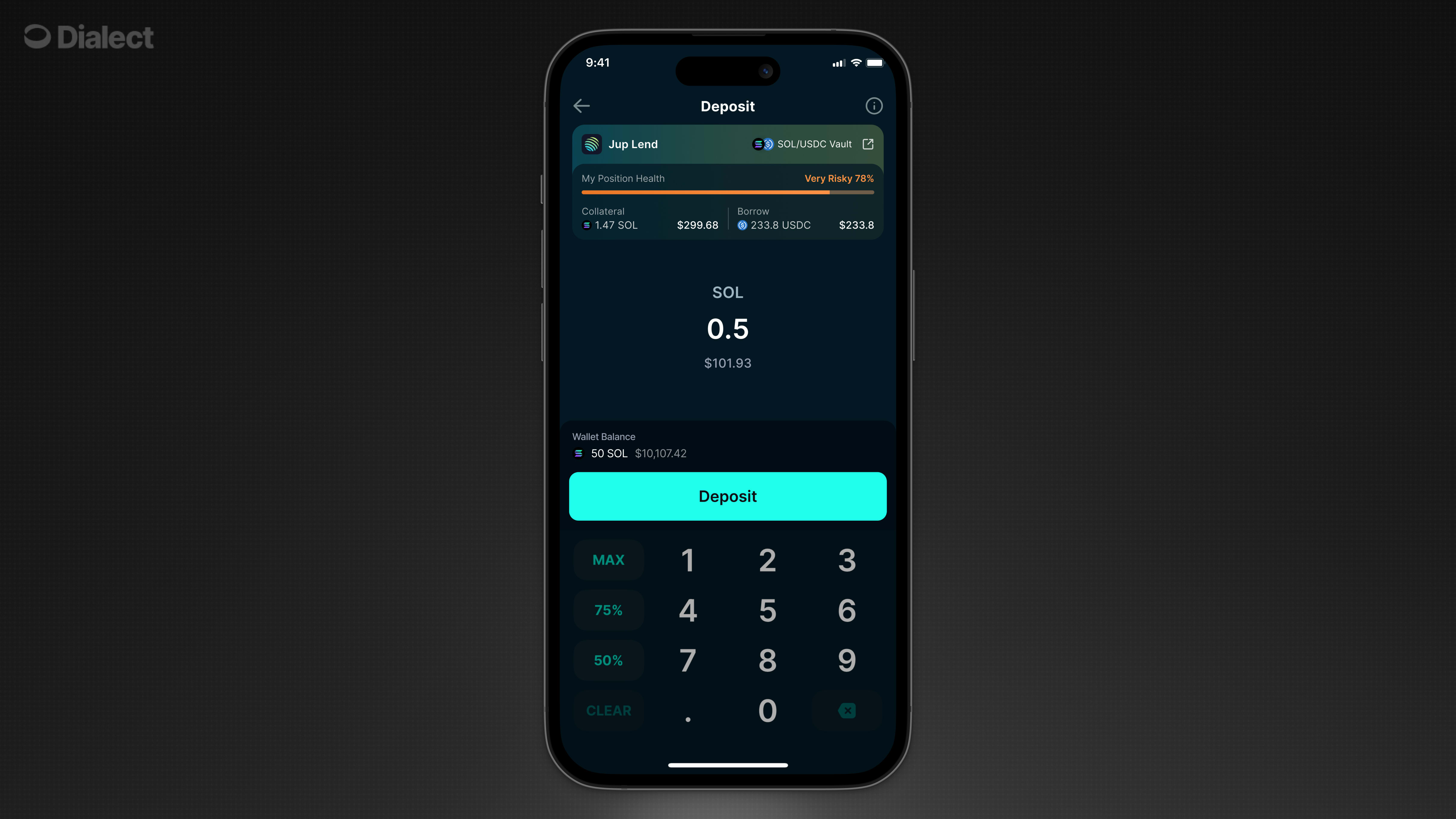
### Step 4: Build the UI
With the response data, you can build rich UIs ranging from simple action buttons in your notification feed to full detail screens with position cards, input interfaces, and transaction controls. The response includes all the data you need: protocol information, token details, position health metrics, blink URLs for actions, and more.
When Dialect's mapping service detects supported protocol URLs in your alerts, it automatically enriches them with contextual data and blink URLs, allowing your users to take immediate action.
Users never leave your application
Rich information to build informed UIs
Blinks handle protocol integrations
Complete transactions in seconds
Currently supports lending protocols (Jupiter Borrow), with more protocols and use cases coming soon.
## Example: Liquidation Warning Flow
For this example, we'll use Jupiter Borrow as the protocol and a scenario where a user's lending position reaches a critical LTV threshold.
### Scenario
* User has a SOL/USDC lending position on Jupiter Borrow
* Position reaches 78% LTV (liquidation threshold is 80%)
* User receives a liquidation warning alert
### Step 1: Send the Alert
Your backend sends an alert with the protocol website URL:
```json {13} theme={null}
{
"recipient": {
"type": "subscriber",
"walletAddress": "6JpNV6DK88auwzKVizdeT4Bw3D44sam5GqjcPCJ7y176"
},
"channels": ["IN_APP", "PUSH"],
"message": {
"title": "Liquidation Warning",
"body": "Your SOL/USDC position is at 78% LTV, approaching liquidation threshold of 80%.",
"actions": [{
"type": "link",
"label": "Add Collateral",
"url": "https://jup.ag/lend/borrow/1/nfts/2433"
}]
}
}
```
### Step 2: Client Receives Enriched Alert
Dialect detects the Jupiter Borrow URL and enriches the response:
```json {10-14} theme={null}
{
"id": "alert-uuid",
"title": "Liquidation Warning",
"body": "Your SOL/USDC position is at 78% LTV, approaching liquidation threshold of 80%.",
"timestamp": "2024-01-15T10:30:00Z",
"actions": [{
"type": "link",
"label": "Add Collateral",
"url": "https://jup.ag/lend/borrow/1/nfts/2433",
"context": {
"type": "position",
"apiUrl": "https://markets.dial.to/api/v0/positions/owners?walletAddresses=6JpNV6DK88auwzKVizdeT4Bw3D44sam5GqjcPCJ7y176&bundleIds=jupiter.borrow.1.2433",
"action": "deposit"
}
}]
}
```
### Step 3: Fetch Position Data
When the user clicks a button in the alert, fetch the position data from the [Markets and Positions API](/api-reference/positions/list-all-market-positions-by-wallet-address):
```bash theme={null}
curl 'https://markets.dial.to/api/v0/positions/owners?walletAddresses=6JpNV6DK88auwzKVizdeT4Bw3D44sam5GqjcPCJ7y176&bundleIds=jupiter.borrow.1.2433' \
--header 'x-dialect-api-key: pk_demo'
```
The response includes detailed position and market data:
```json theme={null}
{
"positions": [
{
"id": "jupiter.borrow.1.2433.deposit",
"type": "lending",
"marketId": "jupiter.borrow.1",
"ownerAddress": "6JpNV6DK88auwzKVizdeT4Bw3D44sam5GqjcPCJ7y176",
"bundleId": "jupiter.borrow.1.2433",
"side": "deposit",
"additionalData": {
"vaultId": 1,
"nftId": 2433
},
"actions": {
"deposit": {
"blinkUrl": "blink:https://jupiter.dial.to/api/v0/lend/borrow/1/deposit?positionId=2433"
},
"withdraw": {
"blinkUrl": "blink:https://jupiter.dial.to/api/v0/lend/borrow/1/2433/withdraw"
}
},
"amount": 0.015060007,
"amountUsd": 3.34,
"ltv": 0.3033,
"liquidationPrice": 84.00917409932147,
"market": { ... }
},
// ... borrow position
]
}
```
```json theme={null}
{
"positions": [
{
"id": "jupiter.borrow.1.2433.deposit",
"type": "lending",
"marketId": "jupiter.borrow.1",
"ownerAddress": "6JpNV6DK88auwzKVizdeT4Bw3D44sam5GqjcPCJ7y176",
"bundleId": "jupiter.borrow.1.2433",
"side": "deposit",
"additionalData": {
"vaultId": 1,
"nftId": 2433
},
"actions": {
"deposit": {
"blinkUrl": "blink:https://jupiter.dial.to/api/v0/lend/borrow/1/deposit?positionId=2433"
},
"withdraw": {
"blinkUrl": "blink:https://jupiter.dial.to/api/v0/lend/borrow/1/2433/withdraw"
}
},
"amount": 0.015060007,
"amountUsd": 3.34,
"ltv": 0.3033,
"liquidationPrice": 84.00917409932147,
"market": {
"id": "jupiter.borrow.1",
"type": "lending",
"provider": {
"id": "jupiter",
"name": "Jupiter",
"icon": "https://imagedelivery.net/C7jfNnfrjpAYWW6YevrFDg/5c23c065-89ef-413b-8deb-6d8c6a849300/public"
},
"token": {
"address": "So11111111111111111111111111111111111111112",
"symbol": "WSOL",
"decimals": 9,
"icon": "https://coin-images.coingecko.com/coins/images/21629/large/solana.jpg?1696520989"
},
"borrowToken": {
"address": "EPjFWdd5AufqSSqeM2qN1xzybapC8G4wEGGkZwyTDt1v",
"symbol": "USDC",
"decimals": 6,
"icon": "https://coin-images.coingecko.com/coins/images/6319/large/usdc.png?1696506694"
},
"websiteUrl": "https://jup.ag/lend/borrow/1",
"depositApy": 0.0784,
"baseDepositApy": 0.0484,
"borrowApy": 0.0597,
"baseBorrowApy": 0.0597,
"totalDeposit": 665220.958436127,
"totalDepositUsd": 147340132.39,
"totalBorrow": 80014008.8212,
"totalBorrowUsd": 79990184.41,
"maxBorrow": 120021000.673021,
"maxLtv": 0.75,
"liquidationLtv": 0.8,
"liquidationPenalty": 0.01,
"additionalData": {},
"actions": {
"deposit": {
"blinkUrl": "blink:https://jupiter.dial.to/api/v0/lend/borrow/1/deposit"
}
}
}
},
{
"id": "jupiter.borrow.1.2433.borrow",
"type": "lending",
"marketId": "jupiter.borrow.1",
"ownerAddress": "6JpNV6DK88auwzKVizdeT4Bw3D44sam5GqjcPCJ7y176",
"bundleId": "jupiter.borrow.1.2433",
"side": "borrow",
"additionalData": {
"vaultId": 1,
"nftId": 2433
},
"actions": {
"borrow": {
"blinkUrl": "blink:https://jupiter.dial.to/api/v0/lend/borrow/1/2433/borrow"
},
"repay": {
"blinkUrl": "blink:https://jupiter.dial.to/api/v0/lend/borrow/1/2433/repay"
}
},
"amount": 1.012143,
"amountUsd": 1.01,
"ltv": 0.3033,
"liquidationPrice": 84.00917409932147,
"market": {
"id": "jupiter.borrow.1",
"type": "lending",
"provider": {
"id": "jupiter",
"name": "Jupiter",
"icon": "https://imagedelivery.net/C7jfNnfrjpAYWW6YevrFDg/5c23c065-89ef-413b-8deb-6d8c6a849300/public"
},
"token": {
"address": "So11111111111111111111111111111111111111112",
"symbol": "WSOL",
"decimals": 9,
"icon": "https://coin-images.coingecko.com/coins/images/21629/large/solana.jpg?1696520989"
},
"borrowToken": {
"address": "EPjFWdd5AufqSSqeM2qN1xzybapC8G4wEGGkZwyTDt1v",
"symbol": "USDC",
"decimals": 6,
"icon": "https://coin-images.coingecko.com/coins/images/6319/large/usdc.png?1696506694"
},
"websiteUrl": "https://jup.ag/lend/borrow/1",
"depositApy": 0.0784,
"baseDepositApy": 0.0484,
"borrowApy": 0.0597,
"baseBorrowApy": 0.0597,
"totalDeposit": 665220.958436127,
"totalDepositUsd": 147340132.39,
"totalBorrow": 80014008.8212,
"totalBorrowUsd": 79990184.41,
"maxBorrow": 120021000.673021,
"maxLtv": 0.75,
"liquidationLtv": 0.8,
"liquidationPenalty": 0.01,
"additionalData": {},
"actions": {
"deposit": {
"blinkUrl": "blink:https://jupiter.dial.to/api/v0/lend/borrow/1/deposit"
}
}
}
}
]
}
```
### Step 4: Build the UI
With the response data, you can build rich UIs ranging from simple action buttons in your notification feed to full detail screens with position cards, input interfaces, and transaction controls. The response includes all the data you need: protocol information, token details, position health metrics, blink URLs for actions, and more.
 For more details on available data fields, and ideas on how to use the data, see [using the data](/alerts/integrate-inbox/api/notifications#using-the-data).
### Step 5: Execute Transaction
When the user submits:
1. Call the blink URL with user's wallet address and amount
2. Receive ready-to-sign transaction
3. Prompt user to sign with their wallet
4. Submit transaction to blockchain
5. Show success state and updated position metrics
## Key Concepts
### Mapping Service
Dialect's mapping service automatically detects supported protocol URLs in your alerts and enriches them with actionable context. Here's the flow:
Your app sends an alert with a protocol URL (e.g., `https://jup.ag/lend/borrow/1/nfts/2433`). The mapping service recognizes the URL pattern from supported protocols.
The service extracts position identifiers from the URL (vault ID, position ID, wallet address) and adds a `context` object to the notification action containing:
* `type`: The kind of data available (e.g., `"position"`)
* `apiUrl`: A pre-filled API endpoint to fetch detailed data
* `action`: The suggested action for the user (e.g., `"deposit"`)
Your client receives the original alert plus the enriched context. The context object is **only present** when the URL is recognized. The original protocol URL remains available as a fallback.
This approach allows you to send simple alerts with protocol URLs, and Dialect automatically adds the necessary context for building rich, actionable UIs.
### Context Object
The `context` object provides everything your client needs to fetch additional data and build interactive experiences:
```typescript theme={null}
{
type: string, // Type of context data available
apiUrl: string, // Pre-filled API endpoint
action: string // Suggested action type
}
```
**Fields:**
* **`type`**: Determines what kind of data the `apiUrl` will return. Currently `"position"` for lending/borrowing positions. Additional types will be added in the future.
* **`apiUrl`**: Complete API endpoint with all required parameters already filled in. Call this URL to get detailed position, market, and blink data.
* **`action`**: The recommended action for the user based on the alert context (e.g., `"deposit"`)
The `type` field is important because it tells your client how to interpret and display the data from the API response.
## Implementation
Learn how to send alerts with blinks.
Handle blinks on the client side.
For more details on available data fields, and ideas on how to use the data, see [using the data](/alerts/integrate-inbox/api/notifications#using-the-data).
### Step 5: Execute Transaction
When the user submits:
1. Call the blink URL with user's wallet address and amount
2. Receive ready-to-sign transaction
3. Prompt user to sign with their wallet
4. Submit transaction to blockchain
5. Show success state and updated position metrics
## Key Concepts
### Mapping Service
Dialect's mapping service automatically detects supported protocol URLs in your alerts and enriches them with actionable context. Here's the flow:
Your app sends an alert with a protocol URL (e.g., `https://jup.ag/lend/borrow/1/nfts/2433`). The mapping service recognizes the URL pattern from supported protocols.
The service extracts position identifiers from the URL (vault ID, position ID, wallet address) and adds a `context` object to the notification action containing:
* `type`: The kind of data available (e.g., `"position"`)
* `apiUrl`: A pre-filled API endpoint to fetch detailed data
* `action`: The suggested action for the user (e.g., `"deposit"`)
Your client receives the original alert plus the enriched context. The context object is **only present** when the URL is recognized. The original protocol URL remains available as a fallback.
This approach allows you to send simple alerts with protocol URLs, and Dialect automatically adds the necessary context for building rich, actionable UIs.
### Context Object
The `context` object provides everything your client needs to fetch additional data and build interactive experiences:
```typescript theme={null}
{
type: string, // Type of context data available
apiUrl: string, // Pre-filled API endpoint
action: string // Suggested action type
}
```
**Fields:**
* **`type`**: Determines what kind of data the `apiUrl` will return. Currently `"position"` for lending/borrowing positions. Additional types will be added in the future.
* **`apiUrl`**: Complete API endpoint with all required parameters already filled in. Call this URL to get detailed position, market, and blink data.
* **`action`**: The recommended action for the user based on the alert context (e.g., `"deposit"`)
The `type` field is important because it tells your client how to interpret and display the data from the API response.
## Implementation
Learn how to send alerts with blinks.
Handle blinks on the client side.